When I tried to convert, it said "ERROR: duplicate bone "pelvis"
Instead of using the joints that come with the model Import a cod 5 player model "char_usa_marine_polonsky". Delete the mesh for this model. Use the world at war joints from char_usa_marine_polonsky joints on your desired character. You might want to move the joints around so the look good in maya on the mesh.
Instead of using the joints that come with the model Import a cod 5 player model "char_usa_marine_polonsky". Delete the mesh for this model. Use the world at war joints from char_usa_marine_polonsky joints on your desired character. You might want to move the joints around so the look good in maya on the mesh.
That sounds too complicated. If there was a video tutorial on it, I would do it.
Basically, all I need now is getting my model looking right in WaW. It looks like this: http://imgur.com/Uk4xVjS He is going to be my boss zombie. So, any help with it?
Okay, the Castro model was fine, but it was a PLAYER MODEL, not a zombie model, so that's why it messed up. I added the Avogadro and he works good! Here is a pic: And, does anybody know how to get the Avogadro to have electricity around him? It would just make him look nicer. Oh, and the help was amazing on this! Thanks so much guys!
Last Edit: May 31, 2016, 08:53:20 pm by oshawat750
Okay, the Castro model was fine, but it was a PLAYER MODEL, not a zombie model, so that's why it messed up. I added the Avogadro and he works good! Here is a pic: (Image removed from quote.) And, does anybody know how to get the Avogadro to have electricity around him? It would just make him look nicer. Oh, and the help was amazing on this! Thanks so much guys!
I'd assume you would need to have a fx around it like drops. Insta kill is just a model with the green fx round it. Maybe you could find a tut about adding custom drops and see if you can do the same with a zombie model?
I'd assume you would need to have a fx around it like drops. Insta kill is just a model with the green fx round it. Maybe you could find a tut about adding custom drops and see if you can do the same with a zombie model?
I made brutus from MOTD and set him up as a boss zombie. There are several tutorials on making boss zombies. Once you setup your boss you can just add something like this in your script and thread it somewhere.
The tutorial can be found here (also note on a lot of the pages there are fixes such as powerup affecting the boss etc. So make sure to read all the pages of comments): http://www.zombiemodding.com/index.php?topic=4099.0
Here is a snippet of what some of my zombiemode_spawner.gsc looks like after I followed the tutorial. Maybe you can see what I did with mine
Code Snippet
Plaintext
if (self.boss == true) { self setModel("brutus_rigged"); self DetachAll(); // REMOVES ZOMBIE HEAD FROM BOSS self.headModel = "bo2_c_zom_zombie_barbwire_head"; self attach(self.headModel, "", true);
self thread zombie_boss_fx(); // This is where you could thread the electricity effects for your Avagadro self thread brutus_spawn_yell(); self thread brutus_death(); {
I put mine at the bottom of my zombiemode_spawner.gsc like this:
Code Snippet
Plaintext
zombie_boss_fx() { while (1) { if(self.health > 0) { playfxontag(level._effect["brutus_fire"],self,"j_ankle_le"); // Just replace brutus_fire with whatever electricity FX you want. Just go look at // them in Effects Editor. Also change j_ankle_le to the tag on your Avagadro where you want the FX to play. // I'm only using 2 but you can have as many as you want. playfxontag(level._effect["brutus_fire"],self,"j_ankle_ri"); wait(8); } else { break; } }
I made brutus from MOTD and set him up as a boss zombie. There are several tutorials on making boss zombies. Once you setup your boss you can just add something like this in your script and thread it somewhere.
The tutorial can be found here (also note on a lot of the pages there are fixes such as powerup affecting the boss etc. So make sure to read all the pages of comments): http://www.zombiemodding.com/index.php?topic=4099.0
Here is a snippet of what some of my zombiemode_spawner.gsc looks like after I followed the tutorial. Maybe you can see what I did with mine
Code Snippet
Plaintext
if (self.boss == true) { self setModel("brutus_rigged"); self DetachAll(); // REMOVES ZOMBIE HEAD FROM BOSS self.headModel = "bo2_c_zom_zombie_barbwire_head"; self attach(self.headModel, "", true);
self thread zombie_boss_fx(); // This is where you could thread the electricity effects for your Avagadro self thread brutus_spawn_yell(); self thread brutus_death(); {
I put mine at the bottom of my zombiemode_spawner.gsc like this:
Code Snippet
Plaintext
zombie_boss_fx() { while (1) { if(self.health > 0) { playfxontag(level._effect["brutus_fire"],self,"j_ankle_le"); // Just replace brutus_fire with whatever electricity FX you want. Just go look at // them in Effects Editor. Also change j_ankle_le to the tag on your Avagadro where you want the FX to play. // I'm only using 2 but you can have as many as you want. playfxontag(level._effect["brutus_fire"],self,"j_ankle_ri"); wait(8); } else { break; } }
self.maxhealth = HEWHEALTH; self.health = HEWHEALTH; self thread play_sound_on_death(); self thread play_avagadro_fx(); // ADD THIS LINE TO YOUR SCRIPT }
Then at the bottom of zombiemode_spawner.gsc add this:
Code Snippet
Plaintext
play_avagadro_fx() { while (1) { if(self.health > 0) { playfxontag(level._effect["brutus_fire"],self,"j_ankle_le"); // Just replace brutus_fire with whatever electricity FX you want. Just go look at // them in Effects Editor. Also change j_ankle_le to the tag on your Avagadro where you want the FX to play. // I'm only using 2 but you can have as many as you want. playfxontag(level._effect["brutus_fire"],self,"j_ankle_ri"); wait(8); } else { break; } }


 Texas
Texas



 oshawat750



 Reply
Reply






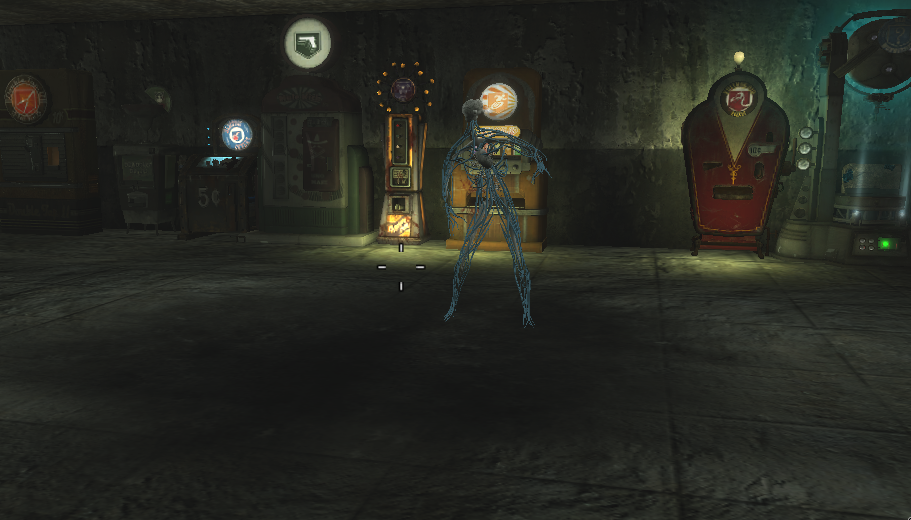 And, does anybody know how to get the Avogadro to have electricity around him? It would just make him look nicer. Oh, and the help was amazing on this! Thanks so much guys!
