UGX-Mods Login

or login with an authentication provider below
Sign In with Google
Sign In with Twitter
Sign In with Discord
Sign In with Steam
Sign In with Facebook
Sign In with Twitch

Making a H.U.D.?

HOT
broken avatar :(
Created 10 years ago
by Wolf MacDowell
0 Members and 1 Guest are viewing this topic.
17,889 views
broken avatar :(
×
broken avatar :(
Location: us
Date Registered: 20 March 2016
Last active: 6 years ago
Posts
50
Respect
Forum Rank
Rotting Walker
Primary Group
Member
My Contact & Social Links
More
Signature
“As a species we're fundamentally insane. Put more than two of us in a room, we pick sides and start dreaming up reasons to kill one another. Why do you think we invented politics and religion?” - Steven King
×
Wolf MacDowell's Contact & Social LinksWolf_MacDowewolff.macdWolf_MacDowellMegaGrimgor
So that last thing I need to figure out (for now at least lol) before I can really get into making this map -- I have a problem where EVERYTHING has to be done before I build a map and by everything I mean I have to know HOW to do everything before I start, even if I am just starting to make Textures or just building the map I have to know how to do all the extra down the road stuff -- is how to make a custom H.U.D. for my zombies map.

[Bolded it to make it easier to read]

But yeah I was wanting some help on how to make a custom heads-up-display for my map.

Help me Obi-Wan Kenobi, you're my only hope.
broken avatar :(
×
broken avatar :(
[UGX] Documentation Writer & Programmer
Location: usLos Angeles, CA
Date Registered: 23 August 2013
Last active: 3 years ago
Posts
1,322
Respect
Forum Rank
Zombie Colossus
Primary Group
UGX Team Member
My Groups
More
My Contact & Social Links
More
Personal Quote
(ง º ω º )ง u wont sum m8y?
Signature
Do not take life too seriously. You will never get out of it alive.
×
DidUknowiPwn's Groups
UGX Team Member
Donator ♥ Benevolent Soul who has our eternal gratitude and exclusive access to betas and the donator section of the forum.
Scripter Elite Has shown excellence and experience in the area of custom scripting in the UGX-Mods community.
BO3 Modtools Alpha
BO3 Modtools Alpha
This user has access to the Black Ops 3 Modtools Alpha
Depending on how you want to make it, it can either be easy or hard.

Give an example to your hud and I'll tell you.
broken avatar :(
×
broken avatar :(
Location: us
Date Registered: 20 March 2016
Last active: 6 years ago
Posts
50
Respect
Forum Rank
Rotting Walker
Primary Group
Member
My Contact & Social Links
More
×
Wolf MacDowell's Contact & Social LinksWolf_MacDowewolff.macdWolf_MacDowellMegaGrimgor
Depending on how you want to make it, it can either be easy or hard.

Give an example to your hud and I'll tell you.
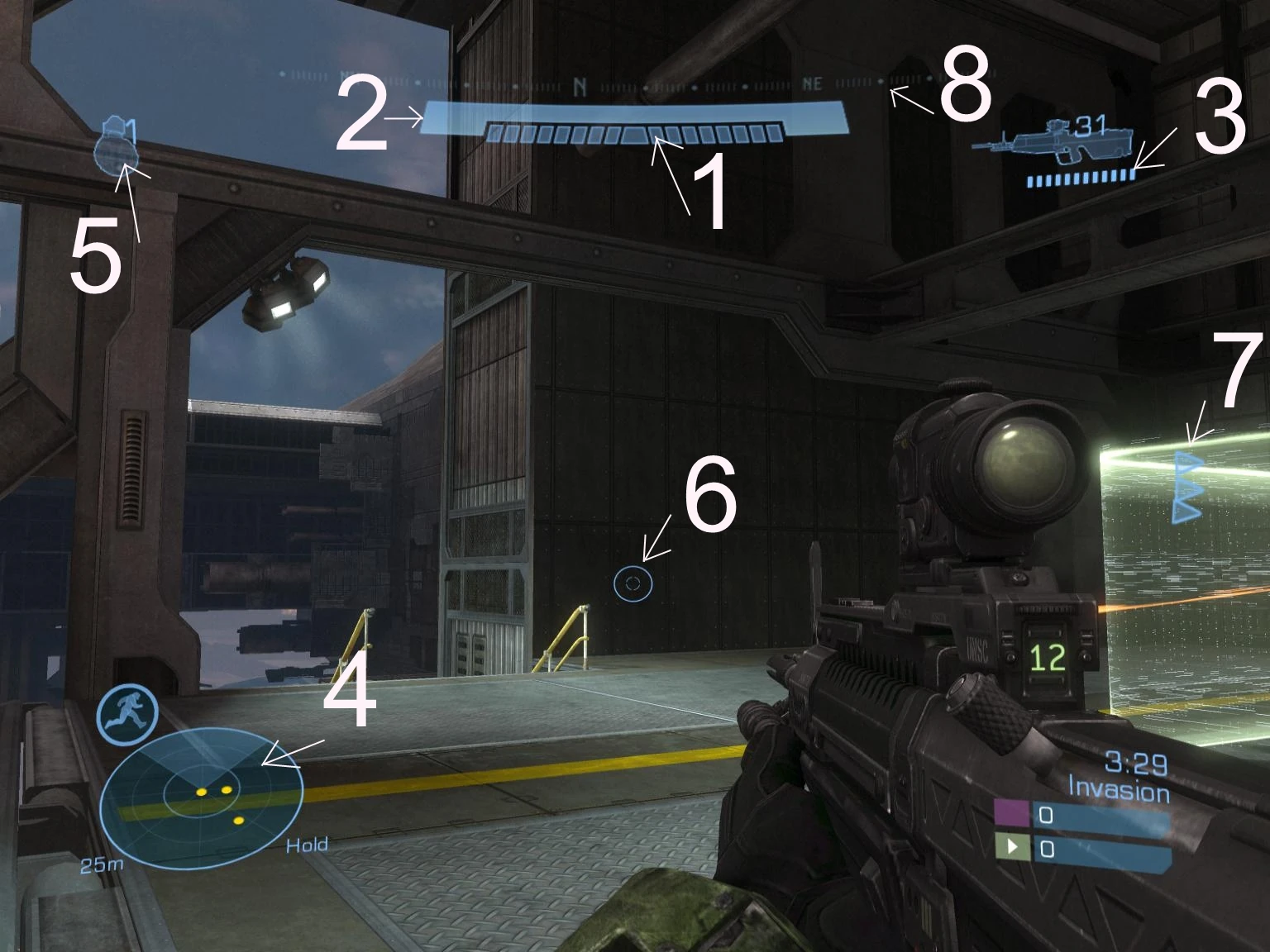
Something roughly like this:


Or more simply something like this:

broken avatar :(
×
broken avatar :(
Location: us
Date Registered: 14 September 2013
Last active: 6 years ago
Posts
1,895
Respect
Forum Rank
Zombie Destroyer
Primary Group
Scripter
My Groups
More
My Contact & Social Links
More
Personal Quote
BE ORIGINAL
Signature
×
MakeCents's Groups
Mapper Has released one or more maps to the UGX-Mods community.
Scripter Has shown effort and knowledge in the area of scripting while being a part of the UGX-Mods community.
BO3 Modtools Alpha
BO3 Modtools Alpha
This user has access to the Black Ops 3 Modtools Alpha
I have a hud like that and I did it mostly in menu. I didn't do the compass part, just the grenades and the weapon image top right with ammo. The full screen image I did with a hud in gsc. It is a bit advanced, but once you understand it, based on simple things.

For the grenades and moving things around, I control a dvar in gsc and use a visible when in the item def in the hud.menu, adding an itemdef for each item being moved, using that dvar. For the weapon images I used the dpadIcon in the weapon file and made custom images for every weapon.

I haven't done the bar in the top-middle but I plan on doing that in gsc probably.

where to go from there depends on what parts you understood from that.

Edit:
This isn't possible, I swear, you learn new things every week doing this stuff. I have for the last two years.
[I have a problem where EVERYTHING has to be done before I build a map and by everything I mean I have to know HOW to do everything before I start, even if I am just starting to make Textures or just building the map I have to know how to do all the extra down the road stuff
Last Edit: March 29, 2016, 04:51:20 pm by MakeCents
broken avatar :(
×
broken avatar :(
Location: us
Date Registered: 27 January 2015
Last active: 9 years ago
Posts
337
Respect
Forum Rank
Perk Hacker
Primary Group
Member
Signature
×
liamsa669's Groups
liamsa669's Contact & Social Links

1. usually done in GSC, but "CG_PLAYER_BAR_HEALTH" might work
2. same as health... just if its over a certain value (only GSC)
3. hud.menu
4. hud.menu w/ dvar to show it
5. is that nades? if so its defined by weaponfiles, and positioned by hud.menu
6. set via weaponfile
7. idk what its pointing to :troll:
8. idk what it is pointing to :D

do u want a specified tutorial on how to make each option? or do you want to figure it out yourself via looking into the places i mentioned
broken avatar :(
×
broken avatar :(
Location: us
Date Registered: 20 March 2016
Last active: 6 years ago
Posts
50
Respect
Forum Rank
Rotting Walker
Primary Group
Member
My Contact & Social Links
More
×
Wolf MacDowell's Contact & Social LinksWolf_MacDowewolff.macdWolf_MacDowellMegaGrimgor
I have a hud like that and I did it mostly in menu. I didn't do the compass part, just the grenades and the weapon image top right with ammo. The full screen image I did with a hud in gsc. It is a bit advanced, but once you understand it, based on simple things.

For the grenades and moving things around, I control a dvar in gsc and use a visible when in the item def in the hud.menu, adding an itemdef for each item being moved, using that dvar. For the weapon images I used the dpadIcon in the weapon file and made custom images for every weapon.

I haven't done the bar in the top-middle but I plan on doing that in gsc probably.

where to go from there depends on what parts you understood from that.

Edit:
This isn't possible, I swear, you learn new things every week doing this stuff. I have for the last two years.

I don't plan on making the whole H.U.D. like the one from Reach I just want to make a sort of "space-y" look to it and swap around where the:

1) Point Amount

2) Weapon Name [or a weapon shown if I can figure a way to do that]

3) Ammo Amount

4) Zombie Round

Probably should have been more clear about that.

I don't much care about the health bar or motion tracker. I mean if I COULD do a health bar that would be great but it doesn't matter and I can learn it later.

But basically I want to figure out how to both:

  • Create different images? for the H.U.D. pieces
  • Move the pieces around on the hud

As well as adding maybe a blue (or colored) outline like you can see on the top image.

And I am a bit of a noob/newb so I don't know what gsc or dvar mean or are. There a way you can simple it down for me?

Double Post Merge: March 29, 2016, 11:46:04 pm
I forgot:

5) Grenade Types

and

6) Perks as well.
Last Edit: March 29, 2016, 11:46:04 pm by Wolf MacDowell
broken avatar :(
×
broken avatar :(
Location: us
Date Registered: 27 January 2015
Last active: 9 years ago
Posts
337
Respect
Forum Rank
Perk Hacker
Primary Group
Member
×
liamsa669's Groups
liamsa669's Contact & Social Links
http://ugx-mods.com/forum/index.php/topic,9409.msg103367.html#msg103367
this is a tutorial to teach you the basics of .menu editing, but the only part you really need from it is
Code Snippet
Plaintext
setitemcolor  COLOR_CODE - this allows you to change the color of the image, too bad there is no outline image function in this engine, only to create a border... which outlines the entire rectangular image
ex: setitemcolor       1 0 1 1

rect COORDINENTS - Allows you to position the item on the screen. The positioning is a set of 4-6 numbers. The numbers go as: Xpos Ypos Xsize Ysize XOrgin YOrgin.
rect 0 0 640 480 // this means the image will be at 0,0 (the top left) and will be 640x480px

1) Point Amount
this is found in MAPNAME\maps\_zombiemode_score.gsc or raw\maps\_zombiemode_score.gsc (if its only found in raw\maps and not MAPNAME\maps, copy it over to MAPNAME\maps). Search for score_x = -103; and    score_y = -71; These are the x\y values for the score that is added (aka these are the yellow/red score that shows up when buying/killing something) the x means left/right; y means up/down

as for the actual score boards
open raw\ui\hud.menu and search for "competitivemodescores". under it, edit the rect values and the hud will move respectively. decreasing the 1st value will move it left, while increasing it will move it right. decreasing the 2nd value will move the scores up.
2) Weapon Name [or a weapon shown if I can figure a way to do that]
to edit the position of the weapon name, open raw\ui\hud.menu and search for "weaponinfo". then add find the */ on line 393 and cut it (ctrl + x){line 393 is under the Second } found under weaponinfo}. paste it on line 383 (ctrl + v) {line 383 is above itemDef} You might want to change the size of the image, http://i.snag.gy/BhrBh.jpg. also, in order to have the weapons have an icon, you must edit the weapon files and add the hud image to "ammoCounterIcon". I recommend using http://ugx-mods.com/forum/index.php/topic,1535.0.html for this. this is the ability to show the weapon inhand

for the actual weaponname, if u want that, open hud.menu and search for "weapname_lowdef", then edit the values under rect (edit the +# part of it and keep the WEAPINFO_x\y part)
3) Ammo Amount
for ammo amount, open hud.menu and search for "clipGraphic", then edit the values under rect (edit the +# part of it and keep the WEAPINFO_x\y part), repeat for "ammostock"... i recommend editing the rect for the "offhandfragammo"/"offhandsmokeammo"/"offhandSmokeIcon"/"offhandFragIcon" since they are the grenade icons
4) Zombie Round
for this, open _zombiemode.gsc and search for "create_chalk_hud( x )" and add 'hud.y = #; ' replace # with a value to change the y coordinate for the hud. if you want to edit the x, you must add the units to x like: "hud.x = x+#; " because this is how the low rounds (1-10) have 2 images

this took a while of searching for the places where waw has some of these stuff (since i rarely edit these), so i hope this helps.
broken avatar :(
×
broken avatar :(
Location: us
Date Registered: 20 March 2016
Last active: 6 years ago
Posts
50
Respect
Forum Rank
Rotting Walker
Primary Group
Member
My Contact & Social Links
More
×
Wolf MacDowell's Contact & Social LinksWolf_MacDowewolff.macdWolf_MacDowellMegaGrimgor
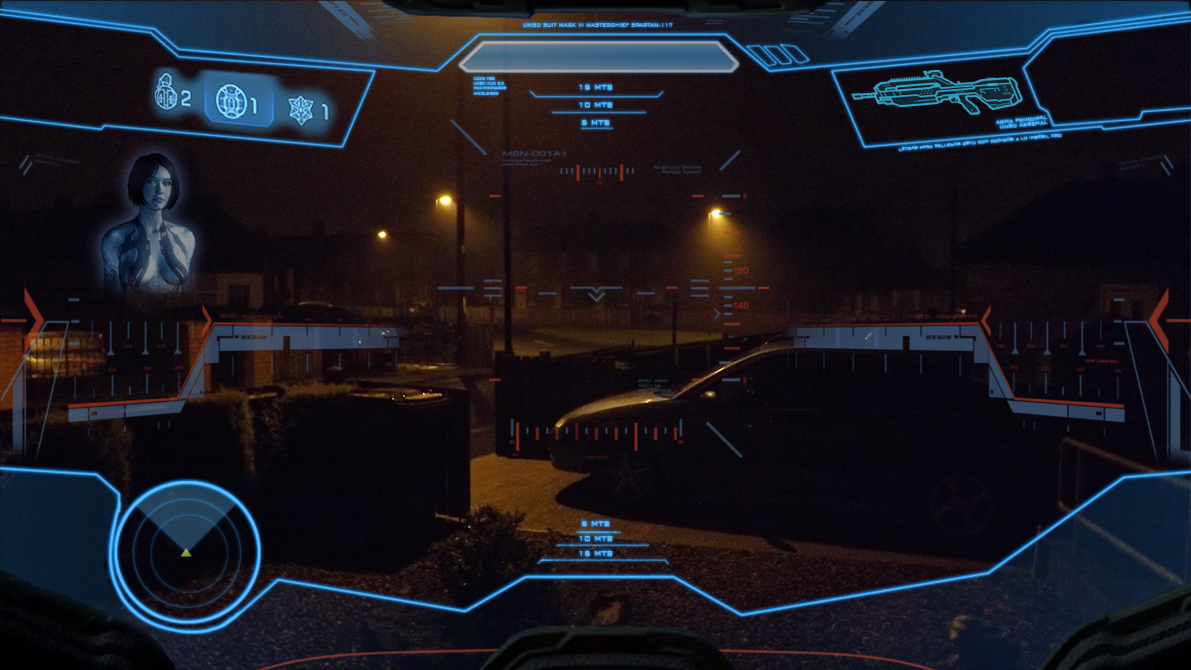
Yeah that helps quite a bit but how would I go about changing the color and adding an outline to the H.U.D. like this:


The faint blue lines across the screen to add detail.

I would like to have a sort of custom outline of the H.U.D. in my game. As you can see in Halo the motion tracker is attached to the H.U.D. outline, the weapon in hand is just under the top outlined area. It makes it look all uniform.

Basically I am hoping to make all the items: Grenade Image, Gun Name, Ammo, Round, etc

a similar color to make them look uniform (maybe making them blue or green, dunno yet) and then adding an outline to it to make it look built into the H.U.D. like the Halo H.U.D. looks.

If that makes any sense.

This screen shows it a lot better:

Last Edit: March 30, 2016, 01:02:25 am by Wolf MacDowell
broken avatar :(
×
broken avatar :(
Location: us
Date Registered: 27 January 2015
Last active: 9 years ago
Posts
337
Respect
Forum Rank
Perk Hacker
Primary Group
Member
×
liamsa669's Groups
liamsa669's Contact & Social Links
Yeah that helps quite a bit but how would I go about changing the color and adding an outline to the H.U.D. like this:

(Image removed from quote.)

The faint blue lines across the screen to add detail.

I would like to have a sort of custom outline of the H.U.D. in my game. As you can see in Halo the motion tracker is attached to the H.U.D. outline, the weapon in hand is just under the top outlined area. It makes it look all uniform.

Basically I am hoping to make all the items: Grenade Image, Gun Name, Ammo, Round, etc

a similar color to make them look uniform (maybe making them blue or green, dunno yet) and then adding an outline to it to make it look built into the H.U.D. like the Halo H.U.D. looks.

If that makes any sense.

This screen shows it a lot better:

(Image removed from quote.)
the spartin hud can be done in a menufile or gsc, doesnt matter. as for the nades, i already told u how to move them... and the outlines cannot be done in the engine, but u can do it in paint.net or photoshop
broken avatar :(
×
broken avatar :(
Location: us
Date Registered: 20 March 2016
Last active: 6 years ago
Posts
50
Respect
Forum Rank
Rotting Walker
Primary Group
Member
My Contact & Social Links
More
×
Wolf MacDowell's Contact & Social LinksWolf_MacDowewolff.macdWolf_MacDowellMegaGrimgor
the spartin hud can be done in a menufile or gsc, doesnt matter. as for the nades, i already told u how to move them... and the outlines cannot be done in the engine, but u can do it in paint.net or photoshop

Yeah I figured I would have to do the outline as an image in photoshop or gimp 2 but how would I go about putting it into the game? What would I have to save the file as and where would I put it to make it work for the map?
broken avatar :(
×
broken avatar :(
Location: us
Date Registered: 27 January 2015
Last active: 9 years ago
Posts
337
Respect
Forum Rank
Perk Hacker
Primary Group
Member
×
liamsa669's Groups
liamsa669's Contact & Social Links
hud.menu method:
open hud.menu, search for 'name          "sprintMeter" ' and replace the whole menudef:
original menuDef:
Code Snippet
Plaintext
menuDef 
{
name "sprintMeter"
fullScreen MENU_FALSE
visible MENU_TRUE
rect 62 -15 40 10 HORIZONTAL_ALIGN_LEFT VERTICAL_ALIGN_BOTTOM

/*
itemDef
{
name "sprintRect"
visible MENU_TRUE
rect 0 0 62 10
background "white"
forecolor 0.0 0.0 0.0 0.8
backcolor 0.0 0.0 0.0 0.8
ownerdraw CG_PLAYER_SPRINT_BACK
decoration
}

itemDef
{
name "sprintRect"
visible MENU_TRUE
rect 1 1 60 8
background "white"
forecolor 0.6 0.6 0.6 0.8
ownerdraw CG_PLAYER_SPRINT_METER
decoration
}
*/
}

new menuDef:
Code Snippet
Plaintext
menuDef 
{
name "sprintMeter"
        fullScreen      1
        rect            0 0 640 480
        style           WINDOW_STYLE_EMPTY
        Visible         1

itemDef
        {
            name            "NAME_THIS_ANYTHING"
            rect            FULLSCREEN
            FullScreen 1
            forecolor       1 1 1 1
            style           WINDOW_STYLE_SHADER
            background      "MATERIAL_NAME"
            decoration
            visible         1
        }
}
Please note the reason im having u use the sprint meter is because no one ever uses it and i really dont want to call it elsewhere when there is so many unused stuff to overrite :D (just like weapons, this is my personal opinion, override the unused b4 i do new). BTW, if u want more images, just copy the whole itemDef (from itemDef to the })


I FORGOT TO MENTION THE MOST IMPORTANT PARTS:
1. you must add the hud.menu to ur csv: menufile,ui\hud.menu
2. the materials must be 2D (in assetmanager under materialType select 2D)
3. the materials must also be included in the csv: material,MATERIALNAME
Last Edit: March 30, 2016, 01:58:04 pm by liamsa669
broken avatar :(
×
broken avatar :(
JbirdHaX
Location: se
Date Registered: 12 March 2012
Last active: 3 years ago
Posts
1,043
Respect
Forum Rank
Zombie Colossus
Primary Group
Mapper Elite
My Groups
More
My Contact & Social Links
More
Personal Quote
(_̅(_̅м̅a̅я̅i̅j̅u̅a̅n̅a̅_̅0 ด้้้้้็็็็็้้้้้็็็็็้
Signature
▒█▀▄▀█ ░█▀▀█ ▒█▀▀█ ▒█▀▀█ ▒█▀▀▀ ▒█▀▀█  ▒█▀▀▀ ▒█░░ ▀█▀ ▀▀█▀▀ ▒█▀▀▀
▒█▒█▒█ ▒█▄▄█ ▒█▄▄█ ▒█▄▄█ ▒█▀▀▀ ▒█▄▄▀  ▒█▀▀▀ ▒█░░ ▒█░ ░▒█░░ ▒█▀▀▀
▒█░░▒█ ▒█░▒█ ▒█░░░ ▒█░░░ ▒█▄▄▄ ▒█░▒█  ▒█▄▄▄ ▒█▄▄ ▄█▄ ░▒█░░ ▒█▄▄▄
×
RadimaX's Groups
Mapper Elite Has shown excellence and experience in the area of custom mapping in the UGX-Mods community.
BO3 Modtools Alpha
BO3 Modtools Alpha
This user has access to the Black Ops 3 Modtools Alpha
i could throw something similair together in photoshop from scratch as im working on a futuristic map myself it would be cool to see ingame anyways...
broken avatar :(
×
broken avatar :(
Location: us
Date Registered: 27 January 2015
Last active: 9 years ago
Posts
337
Respect
Forum Rank
Perk Hacker
Primary Group
Member
×
liamsa669's Groups
liamsa669's Contact & Social Links
i could throw something similair together in photoshop from scratch as im working on a futuristic map myself it would be cool to see ingame anyways...
or u can get the real images from the russian halo and ninja ripper :D
broken avatar :(
×
broken avatar :(
JbirdHaX
Location: se
Date Registered: 12 March 2012
Last active: 3 years ago
Posts
1,043
Respect
Forum Rank
Zombie Colossus
Primary Group
Mapper Elite
My Groups
More
My Contact & Social Links
More
Personal Quote
(_̅(_̅м̅a̅я̅i̅j̅u̅a̅n̅a̅_̅0 ด้้้้้็็็็็้้้้้็็็็็้
×
RadimaX's Groups
Mapper Elite Has shown excellence and experience in the area of custom mapping in the UGX-Mods community.
BO3 Modtools Alpha
BO3 Modtools Alpha
This user has access to the Black Ops 3 Modtools Alpha
im not sure its going to be a for a halo map but the benefits of doing it from scratch is you can adjust it to what you need it for, or tweak the layout so it fits cod waw etc, but if you have access to the original images you are more then welcome to post them here for people that would find it useful.
broken avatar :(
×
broken avatar :(
Location: us
Date Registered: 27 January 2015
Last active: 9 years ago
Posts
337
Respect
Forum Rank
Perk Hacker
Primary Group
Member
×
liamsa669's Groups
liamsa669's Contact & Social Links
im not sure its going to be a for a halo map but the benefits of doing it from scratch is you can adjust it to what you need it for, or tweak the layout so it fits cod waw etc, but if you have access to the original images you are more then welcome to post them here for people that would find it useful.
but they must be original images or images u have the license too. anything from a game is a big NO NO

 
Loading ...