Login Issues
Forgot password?Activate Issues
Account activation email not received? Wrong account activation email used?Other Problems?
Contact Support - Help Center Get help on the UGX Discord. Join it now!


 Reply
Reply Wolf MacDowell Reply
 Los Angeles, CA


 | |
 | Benevolent Soul who has our eternal gratitude and exclusive access to betas and the donator section of the forum. |
 | Has shown excellence and experience in the area of custom scripting in the UGX-Mods community. |
 BO3 Modtools Alpha | This user has access to the Black Ops 3 Modtools Alpha |
DidUknowiPwniAmThatMichaelDidUknowiPwniAmThatMichaeliPwnAtZombiesSiteReplyDepending on how you want to make it, it can either be easy or hard.
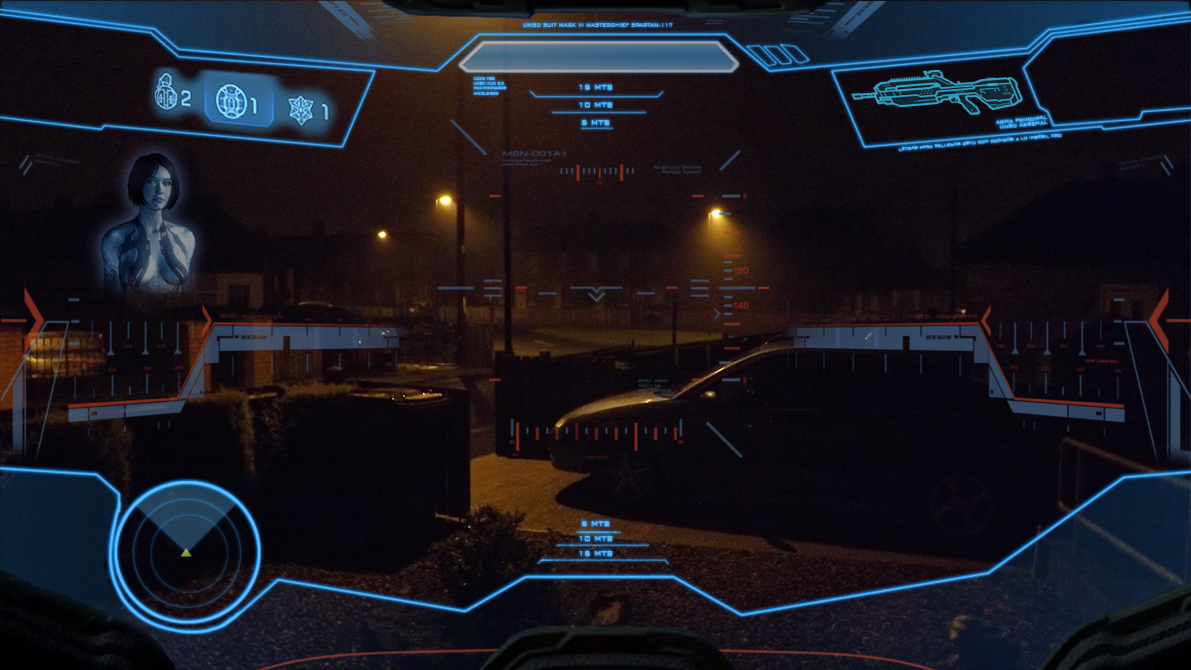
Give an example to your hud and I'll tell you.
 Reply
Reply


 | Has released one or more maps to the UGX-Mods community. |
 | Has shown effort and knowledge in the area of scripting while being a part of the UGX-Mods community. |
BO3 Modtools Alpha | This user has access to the Black Ops 3 Modtools Alpha |
MakeCentsMakeCentsdgMakeCentsGamingMakeCentsGamingMakeCents Gaming[I have a problem where EVERYTHING has to be done before I build a map and by everything I mean I have to know HOW to do everything before I start, even if I am just starting to make Textures or just building the map I have to know how to do all the extra down the road stuff
Reply
 Reply
ReplyI have a hud like that and I did it mostly in menu. I didn't do the compass part, just the grenades and the weapon image top right with ammo. The full screen image I did with a hud in gsc. It is a bit advanced, but once you understand it, based on simple things.
For the grenades and moving things around, I control a dvar in gsc and use a visible when in the item def in the hud.menu, adding an itemdef for each item being moved, using that dvar. For the weapon images I used the dpadIcon in the weapon file and made custom images for every weapon.
I haven't done the bar in the top-middle but I plan on doing that in gsc probably.
where to go from there depends on what parts you understood from that.
Edit:
This isn't possible, I swear, you learn new things every week doing this stuff. I have for the last two years.
Replysetitemcolor COLOR_CODE - this allows you to change the color of the image, too bad there is no outline image function in this engine, only to create a border... which outlines the entire rectangular image
ex: setitemcolor 1 0 1 1
rect COORDINENTS - Allows you to position the item on the screen. The positioning is a set of 4-6 numbers. The numbers go as: Xpos Ypos Xsize Ysize XOrgin YOrgin.
rect 0 0 640 480 // this means the image will be at 0,0 (the top left) and will be 640x480px1) Point Amount
2) Weapon Name [or a weapon shown if I can figure a way to do that]
3) Ammo Amount
4) Zombie Round
Reply Reply
ReplyYeah that helps quite a bit but how would I go about changing the color and adding an outline to the H.U.D. like this:
(Image removed from quote.)
The faint blue lines across the screen to add detail.
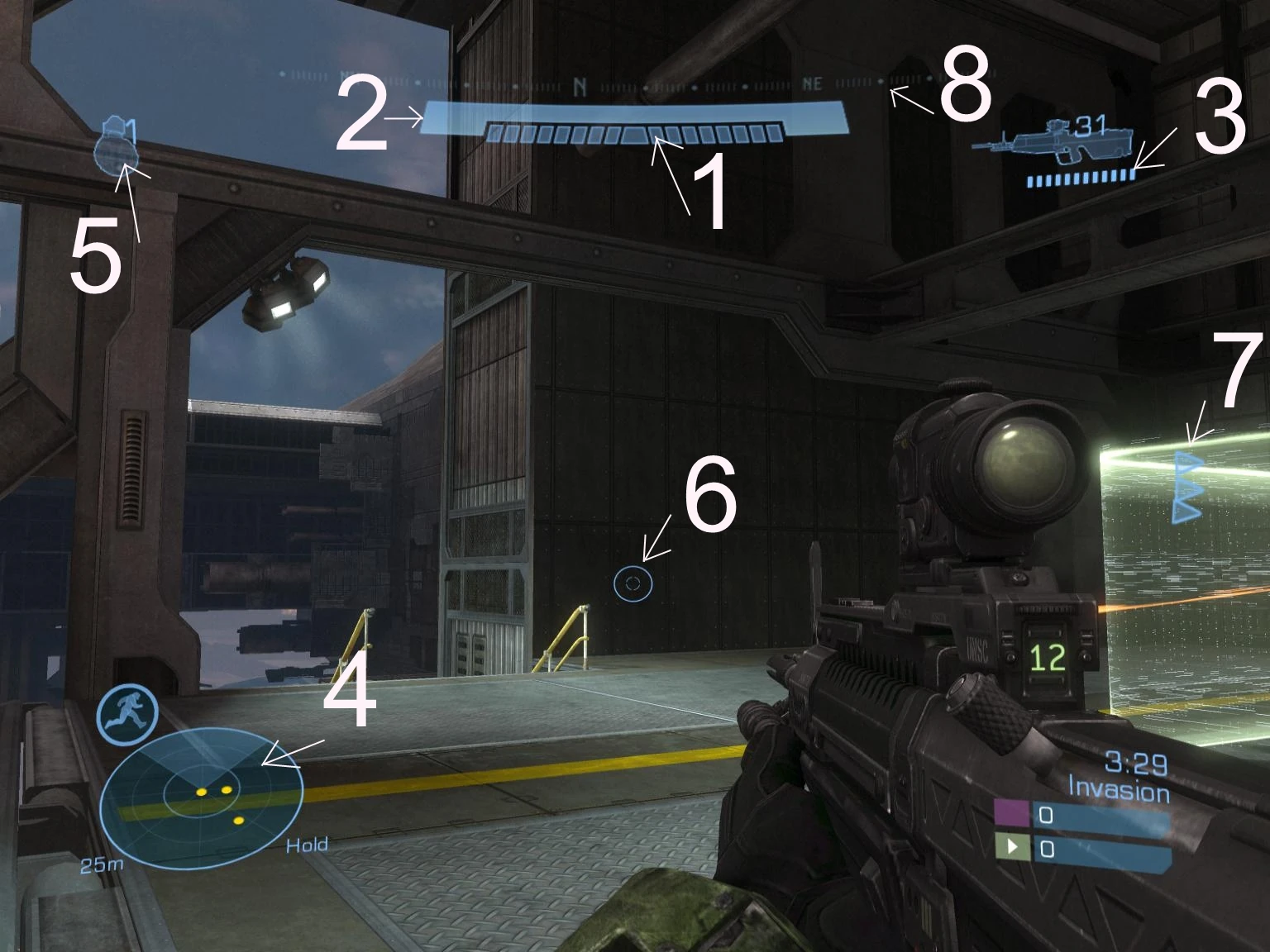
I would like to have a sort of custom outline of the H.U.D. in my game. As you can see in Halo the motion tracker is attached to the H.U.D. outline, the weapon in hand is just under the top outlined area. It makes it look all uniform.
Basically I am hoping to make all the items: Grenade Image, Gun Name, Ammo, Round, etc
a similar color to make them look uniform (maybe making them blue or green, dunno yet) and then adding an outline to it to make it look built into the H.U.D. like the Halo H.U.D. looks.
If that makes any sense.
This screen shows it a lot better:
(Image removed from quote.)
Replythe spartin hud can be done in a menufile or gsc, doesnt matter. as for the nades, i already told u how to move them... and the outlines cannot be done in the engine, but u can do it in paint.net or photoshop
ReplymenuDef
{
name "sprintMeter"
fullScreen MENU_FALSE
visible MENU_TRUE
rect 62 -15 40 10 HORIZONTAL_ALIGN_LEFT VERTICAL_ALIGN_BOTTOM
/*
itemDef
{
name "sprintRect"
visible MENU_TRUE
rect 0 0 62 10
background "white"
forecolor 0.0 0.0 0.0 0.8
backcolor 0.0 0.0 0.0 0.8
ownerdraw CG_PLAYER_SPRINT_BACK
decoration
}
itemDef
{
name "sprintRect"
visible MENU_TRUE
rect 1 1 60 8
background "white"
forecolor 0.6 0.6 0.6 0.8
ownerdraw CG_PLAYER_SPRINT_METER
decoration
}
*/
}menuDef
{
name "sprintMeter"
fullScreen 1
rect 0 0 640 480
style WINDOW_STYLE_EMPTY
Visible 1
itemDef
{
name "NAME_THIS_ANYTHING"
rect FULLSCREEN
FullScreen 1
forecolor 1 1 1 1
style WINDOW_STYLE_SHADER
background "MATERIAL_NAME"
decoration
visible 1
}
} Reply
Replyi could throw something similair together in photoshop from scratch as im working on a futuristic map myself it would be cool to see ingame anyways...
ReplyReplyim not sure its going to be a for a halo map but the benefits of doing it from scratch is you can adjust it to what you need it for, or tweak the layout so it fits cod waw etc, but if you have access to the original images you are more then welcome to post them here for people that would find it useful.
ReplyReply