How exactly do I change the direction of an FX using UGX easy FX? I tried rotating the script_struct in radiant but every FX just points straight up and down. If this is an easy fix pleas let me know. I'm trying to setup an angled spotlight. Thanks
Last Edit: March 07, 2014, 03:34:17 am by whippytrout
Couldn't just make a normal light, and create an info_null where you want it to point to. Then select the light, 'shift-select' the info_null and press W so they connect. And you got a spot light! Only perhaps if you want to make it flickering (allthough you can do that with normal lights to) you want to use a FX.
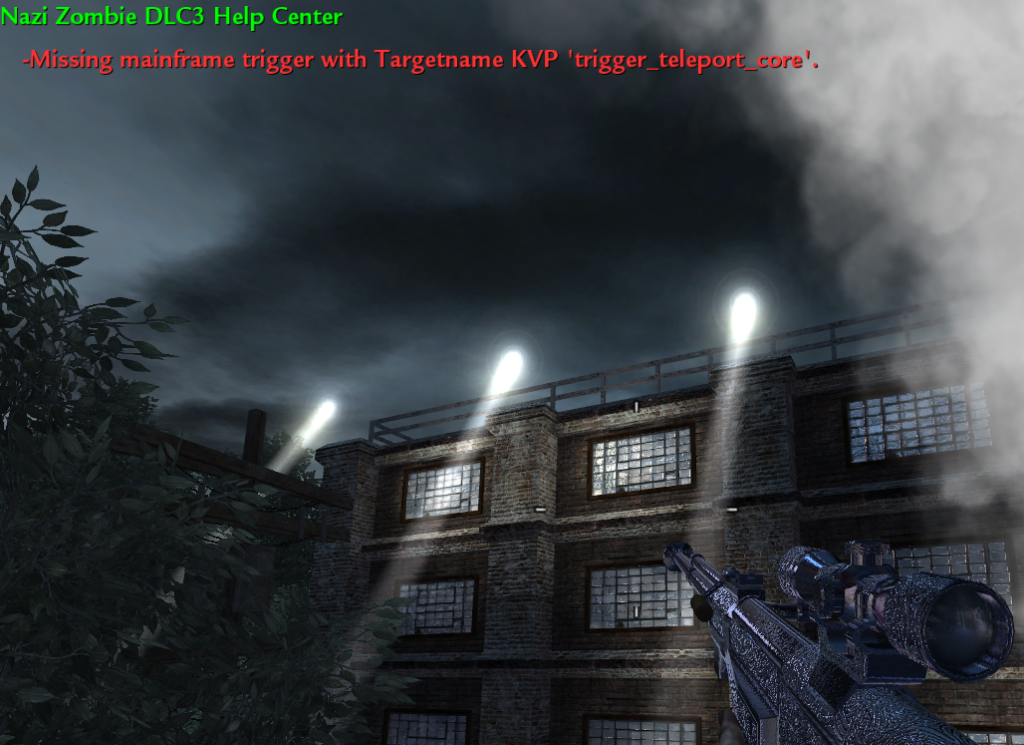
I just want to make my lights look like this picture below. I have that fx I just didnt know how to make them not look straight down. I want to angle them like in the picture. picture is of custom map ZM_camping which I dont own.
Last Edit: March 07, 2014, 04:30:48 am by whippytrout
Couldn't just make a normal light, and create an info_null where you want it to point to. Then select the light, 'shift-select' the info_null and press W so they connect. And you got a spot light! Only perhaps if you want to make it flickering (allthough you can do that with normal lights to) you want to use a FX.
the fx isnt just light, it also adds that white aura like here: but because theres a dyn_light limit, you can delete the light from the fx and in radiant you add a normal light near the struct that wont count towards the dyn_lights Post Merge: March 07, 2014, 04:41:09 am
I just want to make my lights look like this picture below. I have that fx I just didnt know how to make them not look straight down. I want to angle them like in the picture. (Image removed from quote.) picture is of custom map ZM_camping which I dont own.
just point the fx truct arrow to where you want the light to be, and it will see like here:
Last Edit: March 07, 2014, 04:42:04 am by jjbradman
I must not understand because every time I point my struct in a direction it allways plays straight down in game. I've tried a million times. That picture above of the spotlights looks like what I want. I just don't understand 100% what you are saying to do.
Not sure how easy-FX works, but it could very well be the type of FX you use.. If you look in effects-ed under the tab "velocity" you see a box called "move relative to" i guess i must be either "effect now" or "effect at spawn" to work with angles.. Not 100% sure on the definitions, but roughly:
"world" offset calculated against the world axis (?? not fully sure about this one..) "effect at spawn" the effect spawns at the point of origin and stays there (unless it has velocity of it's own) "effect now" the effect spawns at for example a tag_flash and "is connected" to that so moves with it "spawn offset" ofset calculated against the struct / joint axis (?? not fully sure about this one..)
Thanks but I still couldn't get it to work. I guess I'll just rotate the fx in fx-editor then it should work. Just a lot of trial and error on my part to get it facing the right direction. Please if anyone figures something out let me know, you might save me a lot of time.
Last Edit: March 07, 2014, 08:07:13 pm by whippytrout
Has the ability to issue warnings to users, edit and remove posts from the forum and to move topics to other boards. Upholds the rules of the forum. Moderates Chat Rooms.
If the fx does not have the "effect at spawn" OR "effect now" box checked on the "Velocity" tab of EffectsEd, it will ignore the angles it was spawned at and use its own angles. The light effects that were used as examples in UGX Easy FX already have this set up correctly but if youre using a custom FX its probably set up wrong in EffectsEd.
I have that box checked in velocity and I'm using a default FX from fx/env/light/fx_glow_outdoor_spot_dim_static. I compared the FX from ugx easy fx and mine and the setting are the same for each. I guess its just not meant to be. I'm out of options here. I'll keep trying but I just dont get why it wont move. I just want them to point at a slant.
Has the ability to issue warnings to users, edit and remove posts from the forum and to move topics to other boards. Upholds the rules of the forum. Moderates Chat Rooms.
I have that box checked in velocity and I'm using a default FX from fx/env/light/fx_glow_outdoor_spot_dim_static. I compared the FX from ugx easy fx and mine and the setting are the same for each. I guess its just not meant to be. I'm out of options here. I'll keep trying but I just dont get why it wont move. I just want them to point at a slant.
If the setting is correct and you are sure the fx is compiled into your ff with the correct setting and you are sure that you rotated the struct in radiant and you are sure that you recompiled your map to save the changes and it still doesnt tilt ingame, then I don't know what else to tell you because that works for me.
Then I can rotate the script_model and my fx plays like I want it to. I guess that Fx must be weird or something. Thank you guys for your help I learned more about Effects Editor than I knew before.
Has the ability to issue warnings to users, edit and remove posts from the forum and to move topics to other boards. Upholds the rules of the forum. Moderates Chat Rooms.
Then I can rotate the script_model and my fx plays like I want it to. I guess that Fx must be weird or something. Thank you guys for your help I learned more about Effects Editor than I knew before.
That's exactly what UGX Easy FX does to play the fx, so if I had to guess I would say that something isnt being saved in Radiant. Glad you got it working though


 Reply
Reply whippytrout











 Bay Area, California








 Apeldoorn