UGX-Mods Login

or login with an authentication provider below
Sign In with Google
Sign In with Twitter
Sign In with Discord
Sign In with Steam
Sign In with Facebook
Sign In with Twitch

Instant Crash

broken avatar :(
Created 11 years ago
by vinnyz500
0 Members and 1 Guest are viewing this topic.
4,485 views
broken avatar :(
×
broken avatar :(
Location: us
Date Registered: 1 January 2014
Last active: 5 years ago
Posts
397
Respect
Forum Rank
Perk Hacker
Primary Group
Member
My Contact & Social Links
More
Signature
×
vinnyz500's Groups
vinnyz500's Contact & Social LinksXxMrPotatoxXpsn_hackedlobbies4uvinnyz500
Code Snippet
Plaintext
------ Server Initialization ------
Server: mario
Database: Assets Sync Started
Database: Assets Sync Finished
----- R_Init -----
DirectX reports 1024 MB of video memory and 3725 MB of available texture memory.
Using video memory size to cap used texture memory at 1008 MB.
Picmip is set manually.
Using picmip 0 on most textures, 0 on normal maps, and 0 on specular maps
Missing { in info file
Save Message First Frame Shown: 60465
Database: Assets Sync Started
Database: Assets Sync Finished
BinkOpen failed on c:\Program Files (x86)\Steam\steamapps\common\Call of Duty World at War\main\video\mario_load.bik because: Error opening file.
BinkOpen failed on c:\Program Files (x86)\Steam\steamapps\common\Call of Duty World at War\raw\video\mario_load.bik because: Error opening file.
R_Cinematic_BinkOpen 'mario_load' failed: BinkOpen: Error opening file.; trying default.
Unloaded fastfile ui
PMem_Free( ui, 0 )
Loading fastfile localized_mario
Database: Assets Sync Started
Loading fastfile 'localized_mario'
used 12.39 MB memory in DB alloc
Database: Asset

Unhandled exception caught

right before fuckin release... great.

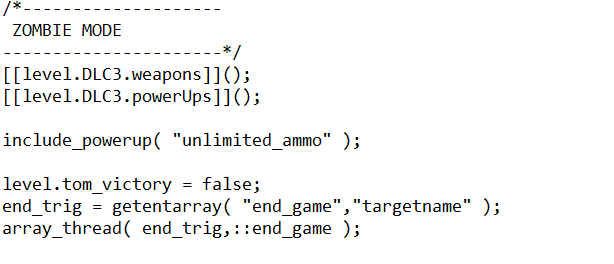
All i made changes to were the following:

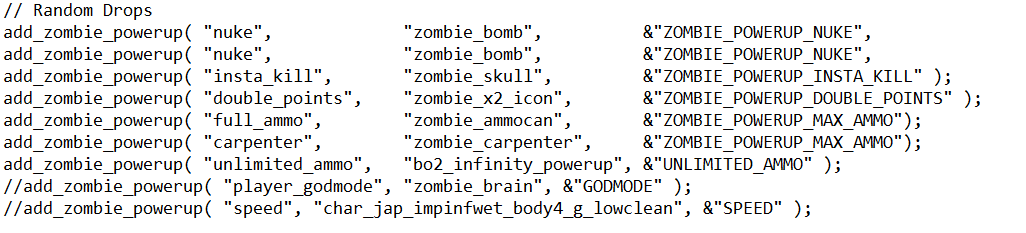
Removed one line of code reguarding an invincibility powerup in here:


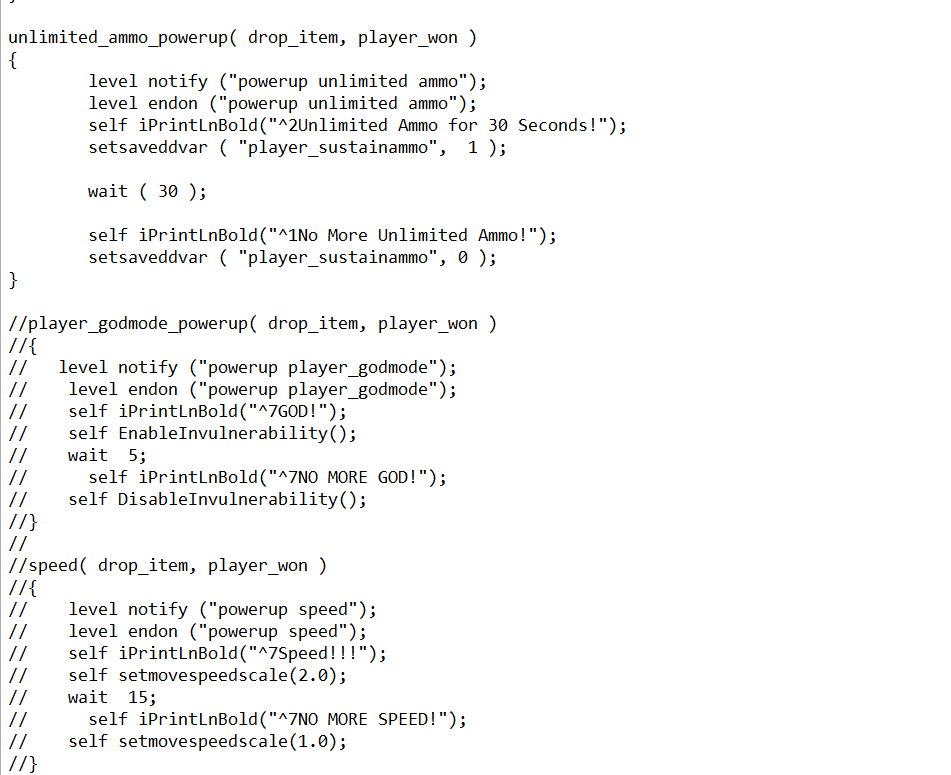
Commented out the code for it:


And changed the shader for unlimited ammo:


I tried reversing all i did and no luck. Help would be appreciated
Last Edit: April 21, 2015, 02:49:20 am by vinnyz500
This topic contains a post which is marked as the Best Answer. Click here to view it.
broken avatar :(
×
broken avatar :(
Location: fi
Date Registered: 25 June 2013
Last active: 2 years ago
Posts
3,997
Respect
Forum Rank
Eviscerator
Primary Group
UGX V.I.P.
My Groups
More
My Contact & Social Links
More
×
HitmanVere's Groups
Donator ♥ Benevolent Soul who has our eternal gratitude and exclusive access to betas and the donator section of the forum.
UGX V.I.P.
UGX V.I.P.
Mapper Has released one or more maps to the UGX-Mods community.
BO3 Modtools Alpha
BO3 Modtools Alpha
This user has access to the Black Ops 3 Modtools Alpha
Add space after //s, might fix it
broken avatar :(
×
broken avatar :(
OnionmanVere Bo21
Location: ieu dnt wnt 2 no
Date Registered: 27 September 2013
Last active: 4 months ago
Posts
1,863
Respect
Forum Rank
Zombie Destroyer
Primary Group
Mapper
My Groups
More
Personal Quote
ok
Signature
Aye mate you don't know me so y don't you shut tf up ok buddy :)
×
Scobalula's Groups
Donator ♥ Benevolent Soul who has our eternal gratitude and exclusive access to betas and the donator section of the forum.
Box Mappers Elite
Box Mappers Elite
Mapper Has released one or more maps to the UGX-Mods community.
Scripter Has shown effort and knowledge in the area of scripting while being a part of the UGX-Mods community.
Scobalula's Contact & Social Links
Like Hitman said you need to add a space between // and words/letters, // = comment but the game won't see //s as a comment and will usually crash.
Marked as best answer by vinnyz500 11 years ago
broken avatar :(
×
broken avatar :(
Location: us
Date Registered: 14 September 2013
Last active: 6 years ago
Posts
1,895
Respect
Forum Rank
Zombie Destroyer
Primary Group
Scripter
My Groups
More
My Contact & Social Links
More
Personal Quote
BE ORIGINAL
Signature
×
MakeCents's Groups
Mapper Has released one or more maps to the UGX-Mods community.
Scripter Has shown effort and knowledge in the area of scripting while being a part of the UGX-Mods community.
BO3 Modtools Alpha
BO3 Modtools Alpha
This user has access to the Black Ops 3 Modtools Alpha
That happens to me quite a bit actually. Different reasons each time I swear. If reversing what you did didn't work then you either did something else by accident, or anytime this happens to me, I first delete my mod in my appdata folder and build again. Then if that don't work, I delete it again, compile and build the mod. Once I rule out any strange issues I then start looking in everything I had open recently. I use a version control (tortoisesvn) so it is pretty easy to see where my work has changed since the last successful run.

I don't notice anything wrong with your scripts, that you posted.
Last Edit: April 21, 2015, 12:24:20 pm by MakeCents
broken avatar :(
×
broken avatar :(
Location: us
Date Registered: 1 January 2014
Last active: 5 years ago
Posts
397
Respect
Forum Rank
Perk Hacker
Primary Group
Member
My Contact & Social Links
More
×
vinnyz500's Groups
vinnyz500's Contact & Social LinksXxMrPotatoxXpsn_hackedlobbies4uvinnyz500
That happens to me quite a bit actually. Different reasons each time I swear. If reversing what you did didn't work then you either did something else by accident, or anytime this happens to me, I first delete my mod in my appdata folder and build again. Then if that don't work, I delete it again, compile and build the mod. Once I rule out any strange issues I then start looking in everything I had open recently. I use a version control (tortoisesvn) so it is pretty easy to see where my work has changed since the last successful run.

I don't notice anything wrong with your scripts, that you posted.
Ok good to know nothing's wrong, I'll try deleting the mod in app data and I'll recompile when I get home, I'll get back to you the results. I'll just set date modified to the top so I can see exactly what I changed, but those are the only scripts i remember changing.

Add space after //s, might fix it
I'll do this also, just for good measure :) Although I never had a problem with commenting them out while it's touching

The thing that is stumping me is the PMem_Free ( ui, 0 ). Is this a ui limit? I didn't add any extra UI's

I remember getting this when I added in a line to zone_source and my mod.csv, but I don't see that ebbing the problem as I fixed a long time ago. Could it be that I'm calling the new perk drop model in mod.csv rather than in zone_source? argh I gotta experiment when I get home
Last Edit: April 21, 2015, 12:34:52 pm by vinnyz500
broken avatar :(
×
broken avatar :(
Location: us
Date Registered: 14 September 2013
Last active: 6 years ago
Posts
1,895
Respect
Forum Rank
Zombie Destroyer
Primary Group
Scripter
My Groups
More
My Contact & Social Links
More
Personal Quote
BE ORIGINAL
×
MakeCents's Groups
Mapper Has released one or more maps to the UGX-Mods community.
Scripter Has shown effort and knowledge in the area of scripting while being a part of the UGX-Mods community.
BO3 Modtools Alpha
BO3 Modtools Alpha
This user has access to the Black Ops 3 Modtools Alpha
The thing that is stumping me is the PMem_Free ( ui, 0 ). Is this a ui limit? I didn't add any extra UI's

I remember getting this when I added in a line to zone_source and my mod.csv, but I don't see that ebbing the problem as I fixed a long time ago. Could it be that I'm calling the new perk drop model in mod.csv rather than in zone_source? argh I gotta experiment when I get home

Well I don't know about that stuff, but in my experience if you don't change things, they shouldn't be broken. So this could of always been there but ignored, or could be a result of another issue, or maybe it is your issue and you just didn't see it till now, cause you compiled or something. Sometimes it is tough to know when your prob actually started.

I personally make a new csv in zone source for everything then include it in my mod.csv, except knife models and sounds, I keep them in my mod.csv. But that is just how I like to be organized my self and how I experience the least amount of issues.   But you can pretty much call everything from you mod.csv as far as I know.
Last Edit: April 21, 2015, 01:03:16 pm by MakeCents
broken avatar :(
×
broken avatar :(
[UGX] Documentation Writer & Programmer
Location: usLos Angeles, CA
Date Registered: 23 August 2013
Last active: 3 years ago
Posts
1,322
Respect
Forum Rank
Zombie Colossus
Primary Group
UGX Team Member
My Groups
More
My Contact & Social Links
More
Personal Quote
(ง º ω º )ง u wont sum m8y?
Signature
Do not take life too seriously. You will never get out of it alive.
×
DidUknowiPwn's Groups
UGX Team Member
Donator ♥ Benevolent Soul who has our eternal gratitude and exclusive access to betas and the donator section of the forum.
Scripter Elite Has shown excellence and experience in the area of custom scripting in the UGX-Mods community.
BO3 Modtools Alpha
BO3 Modtools Alpha
This user has access to the Black Ops 3 Modtools Alpha
fyi setsaveddvar will set it on host only.

If you're doing logfile 1 before you enter the map it should throw a syntax error.

PMem_Free is a function in the engine/game itself not related to script.
broken avatar :(
×
broken avatar :(
Location: us
Date Registered: 1 January 2014
Last active: 5 years ago
Posts
397
Respect
Forum Rank
Perk Hacker
Primary Group
Member
My Contact & Social Links
More
×
vinnyz500's Groups
vinnyz500's Contact & Social LinksXxMrPotatoxXpsn_hackedlobbies4uvinnyz500
fyi setsaveddvar will set it on host only.

If you're doing logfile 1 before you enter the map it should throw a syntax error.

PMem_Free is a function in the engine/game itself not related to script.
it works for all players for some reason

And, log file 1 still sends me crashing BtW
broken avatar :(
  • steviewonder87
  • Deleted Member
×
broken avatar :(
steviewonder87
This user is deleted :(
it works for all players for some reason

And, log file 1 still sends me crashing BtW
It's not intended to prevent the crashing, it's supposed to give you a file in your mod folder called 'console.txt' which should contain some more info.
broken avatar :(
×
broken avatar :(
Location: us
Date Registered: 1 January 2014
Last active: 5 years ago
Posts
397
Respect
Forum Rank
Perk Hacker
Primary Group
Member
My Contact & Social Links
More
×
vinnyz500's Groups
vinnyz500's Contact & Social LinksXxMrPotatoxXpsn_hackedlobbies4uvinnyz500
It's not intended to prevent the crashing, it's supposed to give you a file in your mod folder called 'console.txt' which should contain some more info.
Yeah i looked into the text file it spit out, nothing crazy. Ill post it here later when i get home and am able to test out your suggestions

Double Post Merge: April 21, 2015, 11:44:42 pm
2 recompiles and a ton of mod builds later (With deleting map in appdata, thanks makecents) it finally stopped crashing and gave me an error. I had to keep fixing all the new errors it gave and it works fine now! Thanks for the help guys!
Last Edit: April 21, 2015, 11:44:42 pm by vinnyz500

 
Loading ...