UGX-Mods Login

or login with an authentication provider below
Sign In with Google
Sign In with Twitter
Sign In with Discord
Sign In with Steam
Sign In with Facebook
Sign In with Twitch

Max Terrain/Collision Vertices

broken avatar :(
Created 12 years ago
by RonanMerriman
0 Members and 1 Guest are viewing this topic.
3,712 views
broken avatar :(
×
broken avatar :(
Location: ie
Date Registered: 20 July 2013
Last active: 7 years ago
Posts
283
Respect
Forum Rank
Mr. Elemental
Primary Group
Member
My Contact & Social Links
More
Personal Quote
Pro Mapper in Training
Signature
Firestorm - Releasing June 2019 :troll: | http://ugx-mods.com/forum/index.php?topic=1439.0
×
RonanMerriman's Groups
RonanMerriman's Contact & Social Linksmerrimand8ronan_merrimanmerrimand8
Is there a way to bypass/get rid of this error? I really don't want to just delete lots of terrain patches and make my map look shit.

Spoiler: click to open...


Is is just a matter of reducing the verts or is it something else? Would really like to know before I attempt anything to fix it.

-Ronan
Last Edit: March 15, 2014, 03:52:19 pm by RonanMerriman
broken avatar :(
×
broken avatar :(
drago
Location: mx
Date Registered: 5 July 2013
Last active: 7 years ago
Posts
941
Respect
Forum Rank
The Decider
Primary Group
Member
My Contact & Social Links
More
×
jjbradman's Groups
jjbradman's Contact & Social Linksjjbradmanjjbradmanjjbradman
one question, do you used terrain patches for small stuff like walls, fences, etc?
i've seen people using terrain and curve patches to do that suff and they get this error. because as the name saif they should only be used for terrain as theres that limit :/ one thing that can help you to save verts on your map can be to weld verts  :)

Post Merge: March 15, 2014, 05:17:41 pm
and it seems like 9592 verts couldnt be merged from your brushes. ps. they dont have anything to do with your terrain issues btw.
Last Edit: March 15, 2014, 05:18:00 pm by jjbradman
broken avatar :(
×
broken avatar :(
Location: de
Date Registered: 5 April 2013
Last active: 2 years ago
Posts
279
Respect
Forum Rank
Mr. Elemental
Primary Group
Donator ♥
My Groups
More
My Contact & Social Links
More
Signature
×
IHammY/'s Groups
Donator ♥ Benevolent Soul who has our eternal gratitude and exclusive access to betas and the donator section of the forum.
you could try lowering the density of the patches in some places ;)
broken avatar :(
×
broken avatar :(
Location: ie
Date Registered: 20 July 2013
Last active: 7 years ago
Posts
283
Respect
Forum Rank
Mr. Elemental
Primary Group
Member
My Contact & Social Links
More
Personal Quote
Pro Mapper in Training
×
RonanMerriman's Groups
RonanMerriman's Contact & Social Linksmerrimand8ronan_merrimanmerrimand8
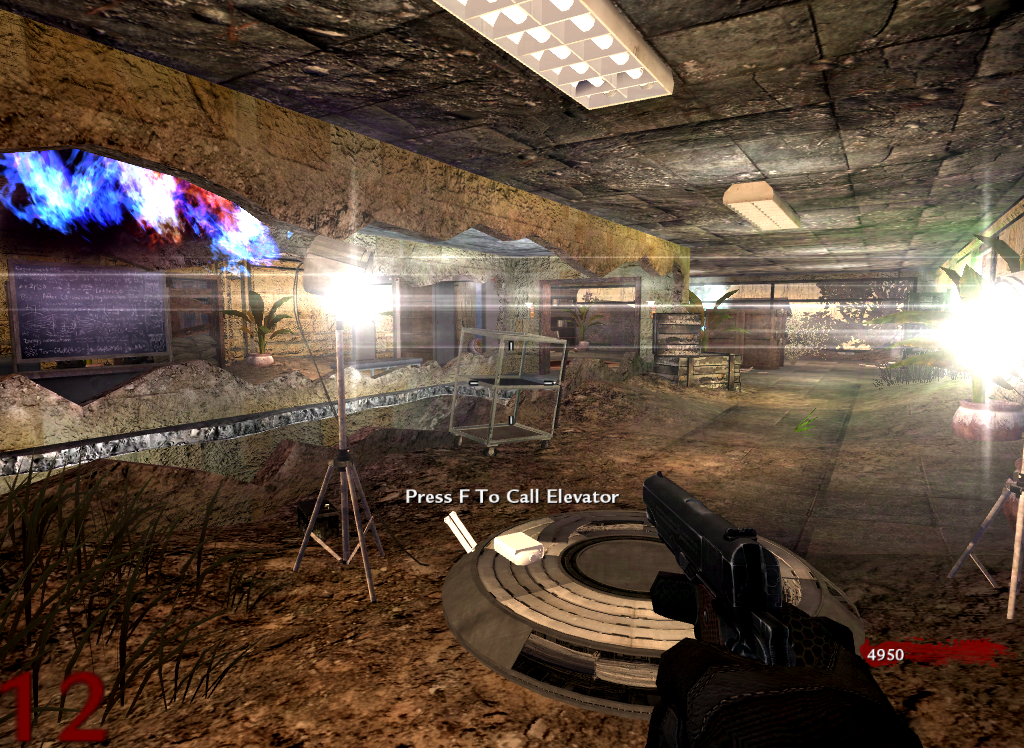
I don't use them for walls. I use them for adding damage blends to walls. I use them for cave walls and cliffs. I do use them for fences. Here are some examples:

Spoiler: click to open...


Is there a way to delete verts where they're not necessary?
broken avatar :(
  • DeletedUser
  • Deleted Member
×
broken avatar :(
DeletedUser
This user is deleted :(
dunno
but that detail....
fap fap fap
broken avatar :(
×
broken avatar :(
Location: ie
Date Registered: 20 July 2013
Last active: 7 years ago
Posts
283
Respect
Forum Rank
Mr. Elemental
Primary Group
Member
My Contact & Social Links
More
Personal Quote
Pro Mapper in Training
×
RonanMerriman's Groups
RonanMerriman's Contact & Social Linksmerrimand8ronan_merrimanmerrimand8
Other random question. How do you increase the texture quality in radiant? The current texture quality hurts my eyes.
Last Edit: March 16, 2014, 03:51:11 pm by RonanMerriman
broken avatar :(
×
broken avatar :(
[UGX] Founder
Location: usBay Area, California
Date Registered: 24 June 2011
Last active: 3 years ago
Posts
5,544
Respect
6,646Add +1
Forum Rank
Immortal
Primary Group
UGX Administrator
My Groups
More
My Contact & Social Links
More
Signature
If Java had true garbage collection, most programs would delete themselves upon execution.
×
treminaor's Groups
UGX Administrator
UGX Team Member
UGX Site Moderator Has the ability to issue warnings to users, edit and remove posts from the forum and to move topics to other boards. Upholds the rules of the forum. Moderates Chat Rooms.
Other random question. How do you increase the texture quality in radiant? The current texture quality hurts my eyes.
Textures -> Texture Resolution -> Maximum (I use High personally).
broken avatar :(
×
broken avatar :(
drago
Location: mx
Date Registered: 5 July 2013
Last active: 7 years ago
Posts
941
Respect
Forum Rank
The Decider
Primary Group
Member
My Contact & Social Links
More
×
jjbradman's Groups
jjbradman's Contact & Social Linksjjbradmanjjbradmanjjbradman
wow your map is awsome! but its like 90% terrain patches or curves. you can try reducing some of them by making models. and about the fences use brushes.
broken avatar :(
×
broken avatar :(
Location: ie
Date Registered: 20 July 2013
Last active: 7 years ago
Posts
283
Respect
Forum Rank
Mr. Elemental
Primary Group
Member
My Contact & Social Links
More
Personal Quote
Pro Mapper in Training
×
RonanMerriman's Groups
RonanMerriman's Contact & Social Linksmerrimand8ronan_merrimanmerrimand8
I found out how to delete verts! Yay! You have to select a row of vert and press Ctrl+Shift+Q and that will get rid of them. I've been reducing the density of terrain patches left, right and centre and the error still remains. I'll try replacing some patches with brushes and models.
broken avatar :(
×
broken avatar :(
drago
Location: mx
Date Registered: 5 July 2013
Last active: 7 years ago
Posts
941
Respect
Forum Rank
The Decider
Primary Group
Member
My Contact & Social Links
More
×
jjbradman's Groups
jjbradman's Contact & Social Linksjjbradmanjjbradmanjjbradman
I found out how to delete verts! Yay! You have to select a row of vert and press Ctrl+Shift+Q and that will get rid of them. I've been reducing the density of terrain patches left, right and centre and the error still remains. I'll try replacing some patches with brushes and models.
remember to make a backup of the map when it was evrthing cool x)

 
Loading ...