UGX-Mods Login

or login with an authentication provider below
Sign In with Google
Sign In with Twitter
Sign In with Discord
Sign In with Steam
Sign In with Facebook
Sign In with Twitch

[Help] Fill gap without using alot of brushes

broken avatar :(
Created 10 years ago
by Deleted User
0 Members and 1 Guest are viewing this topic.
2,566 views
broken avatar :(
  • DeletedUser
  • Deleted Member
×
broken avatar :(
DeletedUser
This user is deleted :(
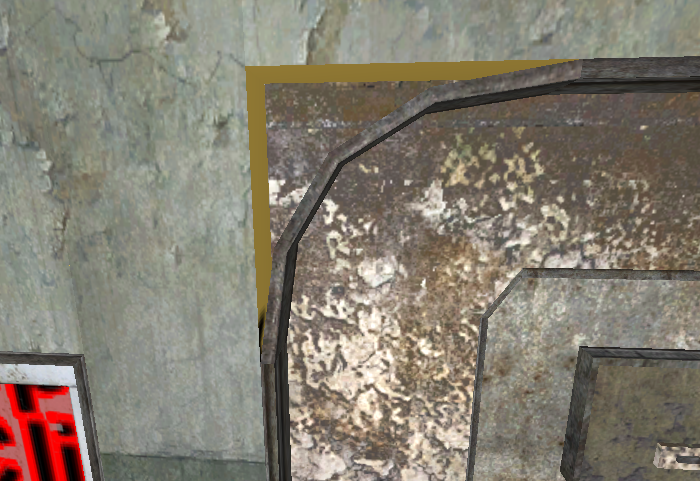
Anyone know how I can fill this gap without using a ton of brushes, I've tried to use a patch but it just stretches the texture and looks ugly.

The only way I can do it is using brushes and reshaping them to fit the gap (currently I'm using 19 brushes to fill the gap).

The reason why I want to fill the gap without using a ton of brushes is if I recall correctly theres a limit to amount of brushes you can use.

Spoiler: click to open...


This topic contains a post which is marked as the Best Answer. Click here to view it.
broken avatar :(
×
broken avatar :(
Location: us
Date Registered: 24 February 2014
Last active: 4 years ago
Posts
240
Respect
Forum Rank
Mr. Elemental
Primary Group
Mapper
My Groups
More
×
josemassacre's Groups
Mapper Has released one or more maps to the UGX-Mods community.
josemassacre's Contact & Social Links
broken avatar :(
×
broken avatar :(
The Last of Us
Location: scotland
Date Registered: 28 September 2013
Last active: 5 days ago
Posts
1,470
Respect
Forum Rank
Zombie Colossus
Primary Group
UGX V.I.P.
My Groups
More
My Contact & Social Links
More
Personal Quote
ฏ๎๎๎๎๎๎๎๎๎๎๎๎๎๎๎๎๎๎๎๎๎๎๎๎๎๎๎๎๎๎๎๎๎๎๎๎๎๎๎๎๎๎๎๎๎๎๎๎๎
Signature
×
smasher248's Groups
Donator ♥ Benevolent Soul who has our eternal gratitude and exclusive access to betas and the donator section of the forum.
UGX V.I.P.
UGX V.I.P.
Mapper Has released one or more maps to the UGX-Mods community.
BO3 Modtools Alpha
BO3 Modtools Alpha
This user has access to the Black Ops 3 Modtools Alpha
smasher248's Contact & Social Linkssmasher248smasher248
i just use a patch them set the texture to natural which should fix the stretched texture problem
broken avatar :(
×
broken avatar :(
Location: nl
Date Registered: 22 September 2013
Last active: 6 months ago
Posts
326
Respect
Forum Rank
Perk Hacker
Primary Group
Mapper
My Groups
More
Personal Quote
Zombie Mapper and Gamer
Signature
My Custom Zombie Maps:

- Nazi zombie Legion
- City of Hell
- The Abandoned Mine
- The Last Undead House (Finished)

more custom zombie maps coming soon
×
gamer9294's Groups
Mapper Has released one or more maps to the UGX-Mods community.
gamer9294's Contact & Social Links
hi man,

maybe this is an option if you want ?


in this picture I only used the patch function without making brushes for in the corners of the door frame :)


best regards,
Gamer9294
Last Edit: February 26, 2016, 12:46:10 pm by gamer9294
Marked as best answer by Deleted User 7 months ago
broken avatar :(
  • DeletedUser
  • Deleted Member
×
broken avatar :(
DeletedUser
This user is deleted :(
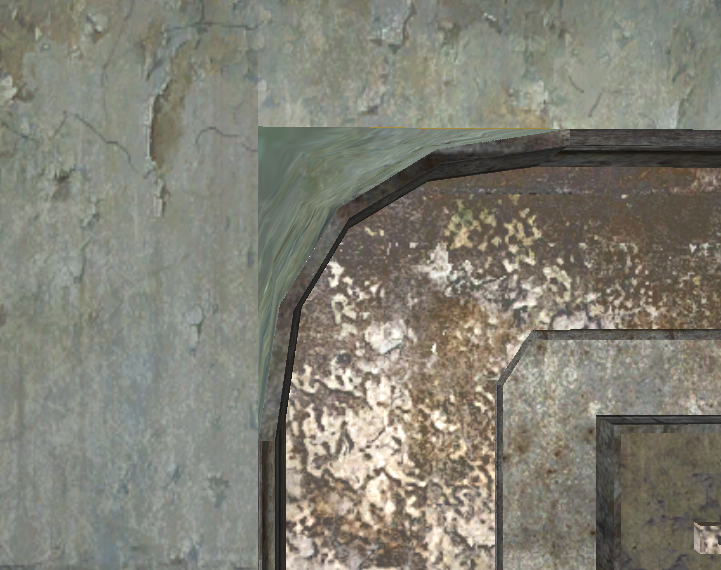
Using josemassacre's method i manged to to fill the gap, i tried using pathces but i couldnt quite figure out how to align the verts correctly so the texture didnt strache and look weird (i also tried setting "Natural" on the texture didnt work)

The best i manged to get using patches is this

Spoiler: click to open...


broken avatar :(
×
broken avatar :(
Location: fi
Date Registered: 25 June 2013
Last active: 2 years ago
Posts
3,997
Respect
Forum Rank
Eviscerator
Primary Group
UGX V.I.P.
My Groups
More
My Contact & Social Links
More
×
HitmanVere's Groups
Donator ♥ Benevolent Soul who has our eternal gratitude and exclusive access to betas and the donator section of the forum.
UGX V.I.P.
UGX V.I.P.
Mapper Has released one or more maps to the UGX-Mods community.
BO3 Modtools Alpha
BO3 Modtools Alpha
This user has access to the Black Ops 3 Modtools Alpha
Using josemassacre's method i manged to to fill the gap, i tried using pathces but i couldnt quite figure out how to align the verts correctly so the texture didnt strache and look weird (i also tried setting "Natural" on the texture didnt work)

The best i manged to get using patches is this

Spoiler: click to open...


Select the patch, press S and do all of the settings there (Natural, Lmap and using stretch options and such) Also, try selecting patch and then pressing mousewheel on the brush next to it

 
Loading ...