So I have gotten to the point now where I can start and load up the map. However, once I am in the game My screen just gets popups. I have recorded a little video so you guys can see for yourself.
Holy crap, someone besides me is actually paying attention to developer errors. The world must be coming to an end. /joke
Can you provide the error log via the console? Everytime that comes up it spits out a error log that points out where the error is coming from.
Are you talking about the console.log under ROOT/mods/my_map_name? I have never done this before and that's the only log I see. The WaW console doesn't show up for me unless the game crashes.
Anyway, here is a pastebin with what's inside the console.log that says script runtime error and everything below it. http://pastebin.com/1xXZgnYc
If this isn't the log you are talking about can you please explain how you get the other one? Sorry I am a bit dumb when it comes to this troubleshooting stuff and what not xD
Are you talking about the console.log under ROOT/mods/my_map_name? I have never done this before and that's the only log I see. The WaW console doesn't show up for me unless the game crashes.
Anyway, here is a pastebin with what's inside the console.log that says script runtime error and everything below it. http://pastebin.com/1xXZgnYc
If this isn't the log you are talking about can you please explain how you get the other one? Sorry I am a bit dumb when it comes to this troubleshooting stuff and what not xD
No, that's fine. You can also look at the console in-game realtime by doing shift + tilda(`). Either way it gives the error.
To fix that error just copy _debug.gsc from root/raw/maps into your root/mods/<mapname>/maps. The _debug that comes with the game(and you are currently using) is from the game's development and using deprecated developer functions. _debug.gsc from raw/maps should have that commented out.
No, that's fine. You can also look at the console in-game realtime by doing shift + tilda(`). Either way it gives the error.
To fix that error just copy _debug.gsc from root/raw/maps into your root/mods/<mapname>/maps. The _debug that comes with the game(and you are currently using) is from the game's development and using deprecated developer functions. _debug.gsc from raw/maps should have that commented out.
The exact same error from _debug.gsc or another error? It looks like you were getting a few different errors at once. The _debug.gsc error should have been fixed though.
Here is what it says from the start of the script runtime errors all the way down to the bottom of the file: http://pastebin.com/GgUJkvCH
It has multiple errors listed but the _debug on is still there somewhere. Also, I don't know why some of them talk about blizzard weather or whatever it says because I don't have any of that stuff on the map?
Here is what it says from the start of the script runtime errors all the way down to the bottom of the file: http://pastebin.com/GgUJkvCH
It has multiple errors listed but the _debug on is still there somewhere. Also, I don't know why some of them talk about blizzard weather or whatever it says because I don't have any of that stuff on the map?
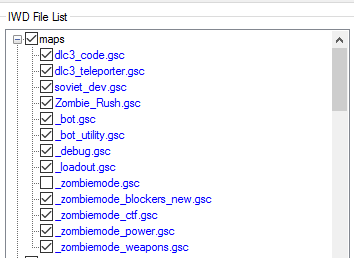
Did you click the checkbox in launcher and rebuild your mod and IWD? Should be listed under "maps" like this:
blizzard FX missing is pretty typical. You can probably just comment( // ) that precache line out in root/raw/clientscripts/<mapname>.csc since no script/function should be using it.
Looks like your missing perk FX. That is not normal at all and could very well be caused by missing mod tool files.
The error related to the power switch will probably go away once you add a power switch. Treyarch never checked for whether the power switch exists so the function just runs and it causes developer errors.
blizzard FX missing is pretty typical. You can probably just comment( // ) that precache line out in root/raw/clientscripts/<mapname>.csc since no script/function should be using it.
Looks like your missing perk FX. That is not normal at all and could very well be caused by missing mod tool files.
The error related to the power switch will probably go away once you add a power switch. Treyarch never checked for whether the power switch exists so the function just runs and it causes developer errors.
I did check it and rebuilt the mod. I just reinstalled WaW and the mod tools today to see if that fixed the problem but it didn't. Would that be fixed if I added Harry's perks because that's what I am going to be doing in the future. After I add those I will then be able to add a power switch.
Double Post Merge: June 05, 2016, 09:20:00 pmOops I didn't mean to write my reply in the quote xD
Last Edit: June 05, 2016, 09:20:00 pm by AGC Trolling
Oops I didn't mean to write my reply in the quote xD
Is it in the IWD in appdata at all?
Eh, I don't really know. If his perks use their own unique perk FX(s) then they should still work... however who knows what else could be missing? No real harm in trying it I guess but personally I'd would make sure mod tools is in working order before messing with things to avoid weird issues.
Eh, I don't really know. If his perks use their own unique perk FX(s) then they should still work... however who knows what else could be missing? No real harm in trying it I guess but personally I'd would make sure mod tools is in working order before messing with things to avoid weird issues.
Yes it is. How do you suggest me doing that? How do you test the tools?
Eh, I don't really know. If his perks use their own unique perk FX(s) then they should still work... however who knows what else could be missing? No real harm in trying it I guess but personally I'd would make sure mod tools is in working order before messing with things to avoid weird issues.
I have installed his perks to see if that fixes the error but now it pops up saying this instead of everything else:
script runtime error (see console for details) cannot cast undefined to bool
These are all the new errors the console.log shows:
If your using Harry's perks you might at well forget about fixing developer errors. His perks causes lots of them and personally I have no idea how to fix them.
Enter this command before starting your map(AKA in the menus):
Someone helped me with the other error and now the map runs good with no issues Thank you guys so much for the help, I really appreciate it.
I don't know which reply on this topic can be considered the "Best Answer", so I am just gonna mark it as the one I feel helped the most just so it says [SOLVED] next to the topic title.


 Reply
Reply

 Wild_LD




 Thank you guys so much for the help, I really appreciate it.