UGX-Mods Login

or login with an authentication provider below
Sign In with Google
Sign In with Twitter
Sign In with Discord
Sign In with Steam
Sign In with Facebook
Sign In with Twitch

[Help] Weird Maya 2012 xanim error

broken avatar :(
Created 11 years ago
by Deleted User
0 Members and 1 Guest are viewing this topic.
3,296 views
broken avatar :(
  • DeletedUser
  • Deleted Member
×
broken avatar :(
DeletedUser
This user is deleted :(
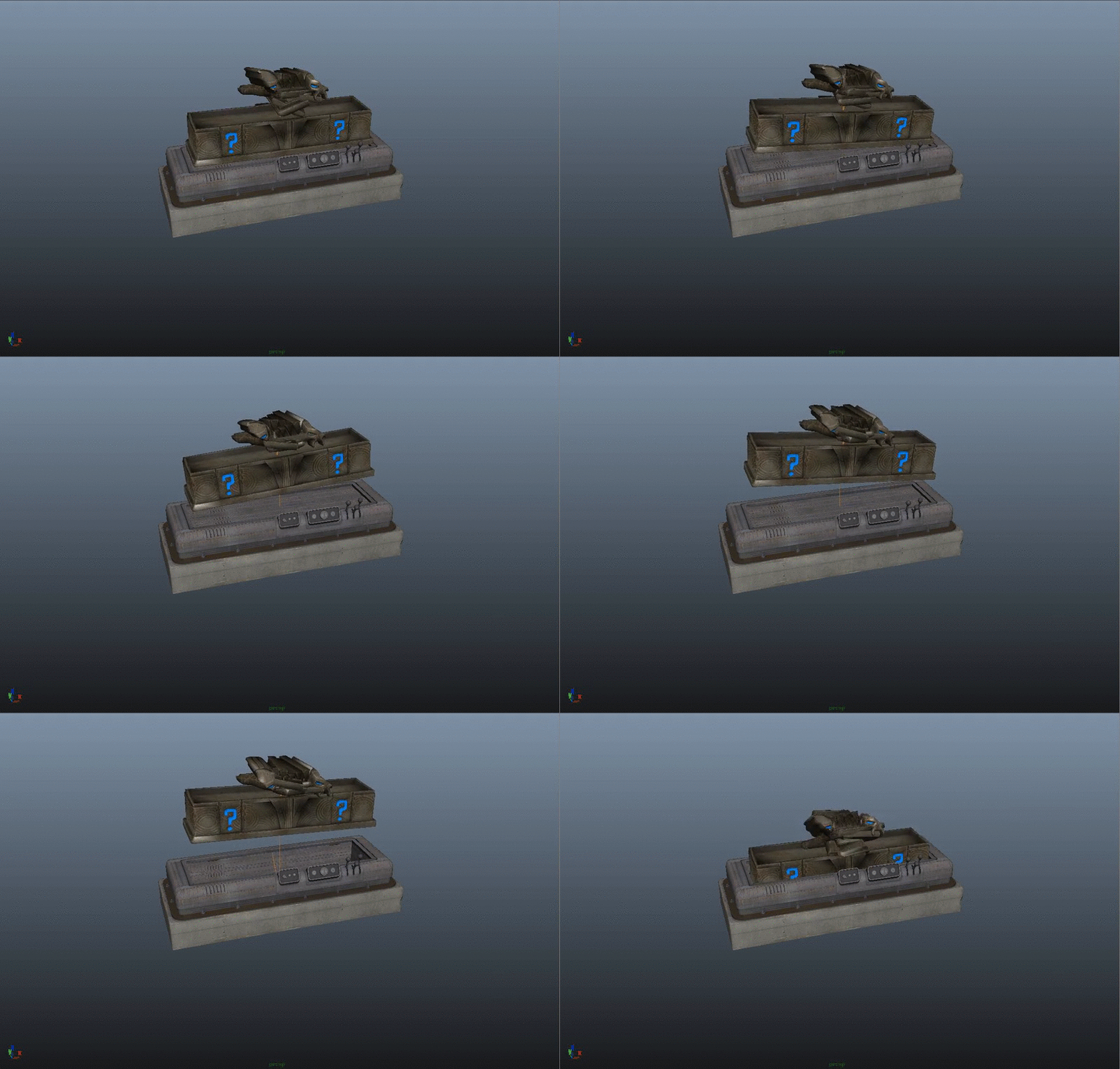
So i just finished porting the origins box model and i went to do the anims but in all of the anims the lid is fucked / not offsetting right, anyone know how to fix this?

Spoiler: click to open...

broken avatar :(
×
broken avatar :(
Location: gbMilton Keynes
Date Registered: 17 January 2014
Last active: 6 years ago
Posts
6,875
Respect
Forum Rank
Immortal
Primary Group
Scripter
My Groups
More
My Contact & Social Links
More
Signature
If you want scripts / features made for you, then contact me by PM or email / skype etc
it will cost you tho so if you have no intention of reciprocating don't even waste my time ;)
×
Harry Bo21's Groups
Donator ♥ Benevolent Soul who has our eternal gratitude and exclusive access to betas and the donator section of the forum.
Scripter Has shown effort and knowledge in the area of scripting while being a part of the UGX-Mods community.
Harry Bo21's Contact & Social LinksHarryBo000[email protected]HarryBo21
So i just finished porting the origins box model and i went to do the anims but in all of the anims the lid is fucked / not offsetting right, anyone know how to fix this?

Spoiler: click to open...

I had this, what settings did you convert by in assman and what code did you use to play the anim
broken avatar :(
  • DeletedUser
  • Deleted Member
×
broken avatar :(
DeletedUser
This user is deleted :(
I had this, what settings did you convert by in assman and what code did you use to play the anim
i havnt exported it yet that is it playing in maya i want it to look right in maya before i export it

EDIT: i havnt even created the entries in assman yet but if you want to see how im playing it ill send you a link to my code in a pm later
broken avatar :(
×
broken avatar :(
Location: gbMilton Keynes
Date Registered: 17 January 2014
Last active: 6 years ago
Posts
6,875
Respect
Forum Rank
Immortal
Primary Group
Scripter
My Groups
More
My Contact & Social Links
More
×
Harry Bo21's Groups
Donator ♥ Benevolent Soul who has our eternal gratitude and exclusive access to betas and the donator section of the forum.
Scripter Has shown effort and knowledge in the area of scripting while being a part of the UGX-Mods community.
Harry Bo21's Contact & Social LinksHarryBo000[email protected]HarryBo21
i havnt exported it yet that is it playing in maya i want it to look right in maya before i export it
i can see yoru video, but you need to fix a ton with the origins box anims anyway. Use graph editor to move it all into its correct places

For the raise i had to add keys for lifting it up to translate Z on j_lid if i recall as there were none
broken avatar :(
  • DeletedUser
  • Deleted Member
×
broken avatar :(
DeletedUser
This user is deleted :(
i can see yoru video, but you need to fix a ton with the origins box anims anyway. Use graph editor to move it all into its correct places

For the raise i had to add keys for lifting it up to translate Z on j_lid if i recall as there were none
um yeah theres a problem with this, im a noob when it comes to maya i only know how to import and export models and anims :( anyways where and how would i use the Graph editor?

EDIT: sorry if this is a dumb question :(

EDIT: also if i move j_lid it effects j_magic_box (j_lid is a child of j_magic_box so to me it shouldnt effect it should it)

Spoiler: click to open...
What it does

tag list

broken avatar :(
×
broken avatar :(
Location: gbMilton Keynes
Date Registered: 17 January 2014
Last active: 6 years ago
Posts
6,875
Respect
Forum Rank
Immortal
Primary Group
Scripter
My Groups
More
My Contact & Social Links
More
×
Harry Bo21's Groups
Donator ♥ Benevolent Soul who has our eternal gratitude and exclusive access to betas and the donator section of the forum.
Scripter Has shown effort and knowledge in the area of scripting while being a part of the UGX-Mods community.
Harry Bo21's Contact & Social LinksHarryBo000[email protected]HarryBo21
not "move", add keys to the animimation

if you just move it, as soon as you export or play, or even change frames itll all just move back to where it was, and it will make other parts mess up, you need to use the graph editor from the "animation windows" and adjust the translate XYZ keys
Last Edit: November 03, 2015, 08:50:51 pm by Harry Bo21
broken avatar :(
  • DeletedUser
  • Deleted Member
×
broken avatar :(
DeletedUser
This user is deleted :(
not "move", add keys to the animimation

if you just move it, as soon as you export or play, or even change frames itll all just move back to where it was, and it will make other parts mess up, you need to use the graph editor from the "animation windows" and adjust the translate XYZ keys
anychance you can tell me where the graph editor is?

EDIT: never mind i found it and now im confused af how do i move the tags (or what not) using this  :-\

Double Post Merge: November 03, 2015, 08:58:12 pm
would it just be easier to not port the origins box and any other anims that do this?
broken avatar :(
×
broken avatar :(
Location: gbMilton Keynes
Date Registered: 17 January 2014
Last active: 6 years ago
Posts
6,875
Respect
Forum Rank
Immortal
Primary Group
Scripter
My Groups
More
My Contact & Social Links
More
×
Harry Bo21's Groups
Donator ♥ Benevolent Soul who has our eternal gratitude and exclusive access to betas and the donator section of the forum.
Scripter Has shown effort and knowledge in the area of scripting while being a part of the UGX-Mods community.
Harry Bo21's Contact & Social LinksHarryBo000[email protected]HarryBo21
anychance you can tell me where the graph editor is?

EDIT: never mind i found it and now im confused af how do i move the tags (or what not) using this  :-\

Double Post Merge: November 03, 2015, 08:58:12 pm
would it just be easier to not port the origins box and any other anims that do this?
I did port the official anims, but you need to "fix" them

Graph editor would be too hard to explain like this, basically selcet a tag ( lid for example )

then graph editor will show all keys for that tag. So If you wanted it to be higher, you would select the translate Z tags and lift them up

There is no tags at all on the lid tag in the anim now, which is why it doesnt move up, they must have made the lid raise by other means or by playing knobbed anims or something in BO2, so i just added translate Z keys for mine, to lift it up and lower it again ( on the close / leave anims )
Last Edit: November 03, 2015, 09:13:38 pm by Harry Bo21

 
Loading ...