UGX-Mods Login

or login with an authentication provider below
Sign In with Google
Sign In with Twitter
Sign In with Discord
Sign In with Steam
Sign In with Facebook
Sign In with Twitch

Path Issues

broken avatar :(
Created 11 years ago
by Scobalula
0 Members and 1 Guest are viewing this topic.
1,873 views
broken avatar :(
×
broken avatar :(
OnionmanVere Bo21
Location: ieu dnt wnt 2 no
Date Registered: 27 September 2013
Last active: 4 months ago
Posts
1,863
Respect
Forum Rank
Zombie Destroyer
Primary Group
Mapper
My Groups
More
Personal Quote
ok
Signature
Aye mate you don't know me so y don't you shut tf up ok buddy :)
×
Scobalula's Groups
Donator ♥ Benevolent Soul who has our eternal gratitude and exclusive access to betas and the donator section of the forum.
Box Mappers Elite
Box Mappers Elite
Mapper Has released one or more maps to the UGX-Mods community.
Scripter Has shown effort and knowledge in the area of scripting while being a part of the UGX-Mods community.
Scobalula's Contact & Social Links
So as the horrors of Frozen Nightmare come close to a release I hit a big stone in my adventures in mapping.

I had several issues before with pathing with paths not activating when a door was opened, fixed thanks to HitmanVere. <3

But after testing my map a bit I noticed they don't like the platforms on my map, after dwelling in ai_shownodes 1 I found this bundle of fun:


As you've probably guessed, the way they are supposed to look is on the platforms, not connecting to random paths on the ground and dropping to the ground.

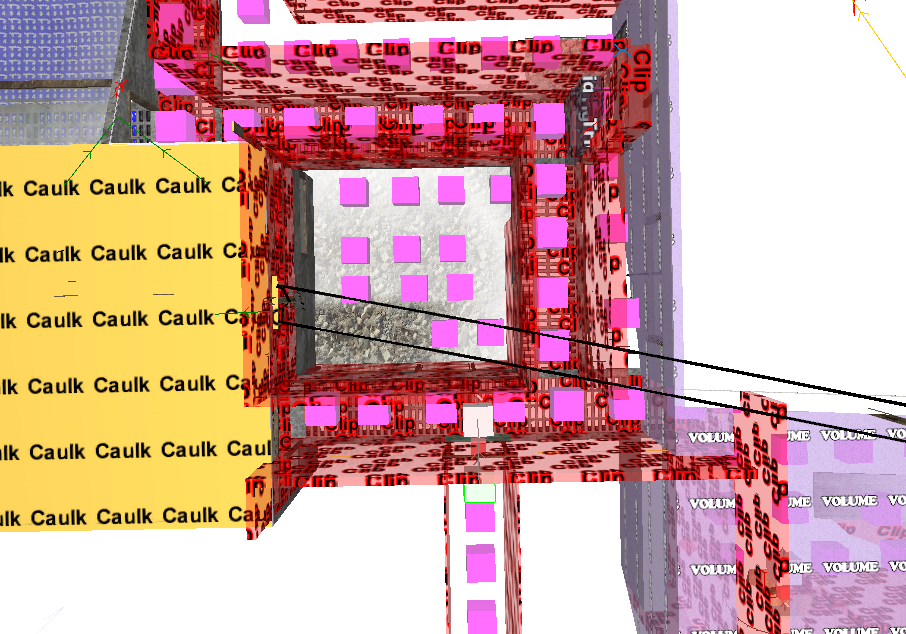
This is how I have it set-up in Radiant:


They are script_brushmodels, I put clips under them to see if that helped, it didn't. Anyone who can assist I would be most grateful. This is one of few issues that are holding me back.
Marked as best answer by Scobalula 11 years ago
broken avatar :(
×
broken avatar :(
Location: nlApeldoorn
Date Registered: 17 December 2013
Last active: 2 years ago
Posts
1,186
Respect
1,332Add +1
Forum Rank
Zombie Colossus
Primary Group
Scripter Elite
My Groups
More
My Contact & Social Links
More
Personal Quote
It aint much, if it aint Dutch
Signature
×
BluntStuffy's Groups
Donator ♥ Benevolent Soul who has our eternal gratitude and exclusive access to betas and the donator section of the forum.
Scripter Elite Has shown excellence and experience in the area of custom scripting in the UGX-Mods community.
Oil Rig Beta Access
Oil Rig Beta Access
BluntStuffy's Contact & Social LinksBluntStuffyBluntstuffy@BluntZombieStuffyZombie
I'm guessing the clips you put under there are also script_brushmodels?
I've Always had that issue with script_brushmodels too, never found a fix/workaround other then using normal worldspawn-brushes as the floor. If that's an options then it's an easy fix..
broken avatar :(
×
broken avatar :(
OnionmanVere Bo21
Location: ieu dnt wnt 2 no
Date Registered: 27 September 2013
Last active: 4 months ago
Posts
1,863
Respect
Forum Rank
Zombie Destroyer
Primary Group
Mapper
My Groups
More
Personal Quote
ok
×
Scobalula's Groups
Donator ♥ Benevolent Soul who has our eternal gratitude and exclusive access to betas and the donator section of the forum.
Box Mappers Elite
Box Mappers Elite
Mapper Has released one or more maps to the UGX-Mods community.
Scripter Has shown effort and knowledge in the area of scripting while being a part of the UGX-Mods community.
Scobalula's Contact & Social Links
I'm guessing the clips you put under there are also script_brushmodels?
I've Always had that issue with script_brushmodels too, never found a fix/workaround other then using normal worldspawn-brushes as the floor. If that's an options then it's an easy fix..

Ahh, yes, they are. lol, I'll try them as standard brushes and report back, thanks for the assistance. :D

EDIT: Yup, it worked, setting the clips as normal brushes, thanks Blunt! :D

Last Edit: June 28, 2015, 03:37:19 pm by Scobalula

 
Loading ...