UGX-Mods Login

or login with an authentication provider below
Sign In with Google
Sign In with Twitter
Sign In with Discord
Sign In with Steam
Sign In with Facebook
Sign In with Twitch

Model Error In Map

broken avatar :(
Created 11 years ago
by RichGaming
0 Members and 1 Guest are viewing this topic.
3,660 views
broken avatar :(
×
broken avatar :(
Location: gb
Date Registered: 9 November 2013
Last active: 5 years ago
Posts
502
Respect
Forum Rank
Zombie Enslaver
Primary Group
Mapper
My Groups
More
My Contact & Social Links
More
Personal Quote
Custom Zombies Videos: YouTube.com/RichGaming
Signature
YouTube: YouTube.com/RichGaming
Twitter: Twitter.com/RichGaming

×
RichGaming's Groups
Donator ♥ Benevolent Soul who has our eternal gratitude and exclusive access to betas and the donator section of the forum.
Mapper Has released one or more maps to the UGX-Mods community.
RichGaming's Contact & Social LinksRich_Gamingrichgaming1RichGamingRichGaming1
When testing my map I have been receiving an error that causes models in the map to disappear and re-appear randomly. I was told that this may be an error to do with LOD settings but I have changed all LOD settings to 7000 on the models in the map. If anyone can help me fix this problem it would be greatly appreciated and credit will be given when the map is released. Thank you!

http://www.youtube.com/watch?v=e0xtHOTgssM
broken avatar :(
  • steviewonder87
  • Deleted Member
×
broken avatar :(
steviewonder87
This user is deleted :(
When testing my map I have been receiving an error that causes models in the map to disappear and re-appear randomly. I was told that this may be an error to do with LOD settings but I have changed all LOD settings to 7000 on the models in the map. If anyone can help me fix this problem it would be greatly appreciated and credit will be given when the map is released. Thank you!

http://www.youtube.com/watch?v=e0xtHOTgssM
If you set the LOD distance to 0 on the highest LOD model (and remove the others) the model won't disappear or change at all. The distances in assman determine which LOD model should be used at whichever distance, setting them all to 7000 is not a good idea lol.
broken avatar :(
×
broken avatar :(
Location: gb
Date Registered: 9 November 2013
Last active: 5 years ago
Posts
502
Respect
Forum Rank
Zombie Enslaver
Primary Group
Mapper
My Groups
More
My Contact & Social Links
More
Personal Quote
Custom Zombies Videos: YouTube.com/RichGaming
×
RichGaming's Groups
Donator ♥ Benevolent Soul who has our eternal gratitude and exclusive access to betas and the donator section of the forum.
Mapper Has released one or more maps to the UGX-Mods community.
RichGaming's Contact & Social LinksRich_Gamingrichgaming1RichGamingRichGaming1
If you set the LOD distance to 0 on the highest LOD model (and remove the others) the model won't disappear or change at all. The distances in assman determine which LOD model should be used at whichever distance, setting them all to 7000 is not a good idea lol.

Thanks for the quick reply. I will try this out and get back to you if it fixes the issue. Thanks once again!
broken avatar :(
×
broken avatar :(
Location: gb
Date Registered: 9 November 2013
Last active: 5 years ago
Posts
502
Respect
Forum Rank
Zombie Enslaver
Primary Group
Mapper
My Groups
More
My Contact & Social Links
More
Personal Quote
Custom Zombies Videos: YouTube.com/RichGaming
×
RichGaming's Groups
Donator ♥ Benevolent Soul who has our eternal gratitude and exclusive access to betas and the donator section of the forum.
Mapper Has released one or more maps to the UGX-Mods community.
RichGaming's Contact & Social LinksRich_Gamingrichgaming1RichGamingRichGaming1
If you set the LOD distance to 0 on the highest LOD model (and remove the others) the model won't disappear or change at all. The distances in assman determine which LOD model should be used at whichever distance, setting them all to 7000 is not a good idea lol.

Hi, I don't think changing the LOD is working. It's not just Black Ops 2 models that this is happening on. it's even models for WaW. E.g. the bottom section of the box.
broken avatar :(
  • steviewonder87
  • Deleted Member
×
broken avatar :(
steviewonder87
This user is deleted :(
Hi, I don't think changing the LOD is working. It's not just Black Ops 2 models that this is happening on. it's even models for WaW. E.g. the bottom section of the box.
WAW models have LOD models too. If you back up from the stock perk machines from a distance you'll see them pop-up when you get closer.
broken avatar :(
×
broken avatar :(
Location: fi
Date Registered: 25 June 2013
Last active: 2 years ago
Posts
3,997
Respect
Forum Rank
Eviscerator
Primary Group
UGX V.I.P.
My Groups
More
My Contact & Social Links
More
×
HitmanVere's Groups
Donator ♥ Benevolent Soul who has our eternal gratitude and exclusive access to betas and the donator section of the forum.
UGX V.I.P.
UGX V.I.P.
Mapper Has released one or more maps to the UGX-Mods community.
BO3 Modtools Alpha
BO3 Modtools Alpha
This user has access to the Black Ops 3 Modtools Alpha
WAW models have LOD models too. If you back up from the stock perk machines from a distance you'll see them pop-up when you get closer.

But models would disappear/appear at same distance. In his video he had to back up a lot before they disappear and the models appear when he gets back close
broken avatar :(
  • steviewonder87
  • Deleted Member
×
broken avatar :(
steviewonder87
This user is deleted :(
But models would disappear/appear at same distance. In his video he had to back up a lot before they disappear and the models appear when he gets back close
Yeh I'm guessing that's some weird bug because he set all the LOD models to 7000 lol.
broken avatar :(
×
broken avatar :(
Location: fi
Date Registered: 25 June 2013
Last active: 2 years ago
Posts
3,997
Respect
Forum Rank
Eviscerator
Primary Group
UGX V.I.P.
My Groups
More
My Contact & Social Links
More
×
HitmanVere's Groups
Donator ♥ Benevolent Soul who has our eternal gratitude and exclusive access to betas and the donator section of the forum.
UGX V.I.P.
UGX V.I.P.
Mapper Has released one or more maps to the UGX-Mods community.
BO3 Modtools Alpha
BO3 Modtools Alpha
This user has access to the Black Ops 3 Modtools Alpha
Yeh I'm guessing that's some weird bug because he set all the LOD models to 7000 lol.

Yeah, I told him to set them at 7k. Rich, send me the map and if same bug happens to me, its in map. If it doesnt, then its your PC
broken avatar :(
  • steviewonder87
  • Deleted Member
×
broken avatar :(
steviewonder87
This user is deleted :(
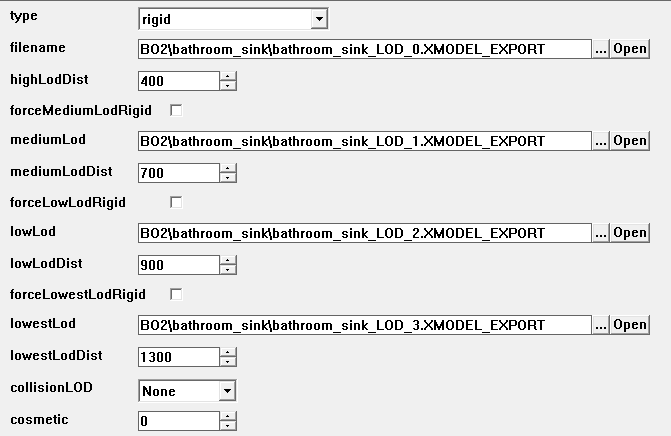
If you export the GDT with Lime it will give you the correct LOD distance settings in Assman, for example:


They should be getting progressively larger, not all the same value.
broken avatar :(
×
broken avatar :(
Location: gb
Date Registered: 9 November 2013
Last active: 5 years ago
Posts
502
Respect
Forum Rank
Zombie Enslaver
Primary Group
Mapper
My Groups
More
My Contact & Social Links
More
Personal Quote
Custom Zombies Videos: YouTube.com/RichGaming
×
RichGaming's Groups
Donator ♥ Benevolent Soul who has our eternal gratitude and exclusive access to betas and the donator section of the forum.
Mapper Has released one or more maps to the UGX-Mods community.
RichGaming's Contact & Social LinksRich_Gamingrichgaming1RichGamingRichGaming1
If you export the GDT with Lime it will give you the correct LOD distance settings in Assman, for example:

(Image removed from quote.)

They should be getting progressively larger, not all the same value.

Yeah, those are the kind of LOD's that were on the models originally. I put those to 7000 because of the model issue.
broken avatar :(
×
broken avatar :(
Location: gbMilton Keynes
Date Registered: 17 January 2014
Last active: 6 years ago
Posts
6,875
Respect
Forum Rank
Immortal
Primary Group
Scripter
My Groups
More
My Contact & Social Links
More
Signature
If you want scripts / features made for you, then contact me by PM or email / skype etc
it will cost you tho so if you have no intention of reciprocating don't even waste my time ;)
×
Harry Bo21's Groups
Donator ♥ Benevolent Soul who has our eternal gratitude and exclusive access to betas and the donator section of the forum.
Scripter Has shown effort and knowledge in the area of scripting while being a part of the UGX-Mods community.
Harry Bo21's Contact & Social LinksHarryBo000[email protected]HarryBo21
Yeah, those are the kind of LOD's that were on the models originally. I put those to 7000 because of the model issue.
putting them all on 7000 will make it always load the first LOD as itll always be in distance, making the others totally irrelevent

And if your out of the "7000" range, then no model will appear at all - because the others will be overlooked entirely by the engine, and no LOD is set for distances over 7000 at all

My understanding is LODs work like this

LOD 1 range - this will be displayed if you are less than "range" away

LOD 2 range - this will appear if your greater than the distance of LOD 1 range, but less that the LOD 3 range

upto, whatever you set as the highest LOD. Doesnt have to be 4, could just be 2 and the second with a very high distance allowance
Last Edit: June 01, 2015, 01:44:54 am by Harry Bo21

 
Loading ...