UGX-Mods Login

or login with an authentication provider below
Sign In with Google
Sign In with Twitter
Sign In with Discord
Sign In with Steam
Sign In with Facebook
Sign In with Twitch

Ported Weapon Fixing

broken avatar :(
Created 12 years ago
by sethnorris
0 Members and 1 Guest are viewing this topic.
2,484 views
broken avatar :(
×
broken avatar :(
Location: es
Date Registered: 15 August 2013
Last active: 7 years ago
Posts
161
Respect
Forum Rank
Pack-a-Puncher
Primary Group
Mapper
My Groups
More
Signature
Enjoy my work? Feel free to donate here to support me

Wanna become a Patron? Try my Patreon Page
×
sethnorris's Groups
Mapper Has released one or more maps to the UGX-Mods community.
sethnorris's Contact & Social Links
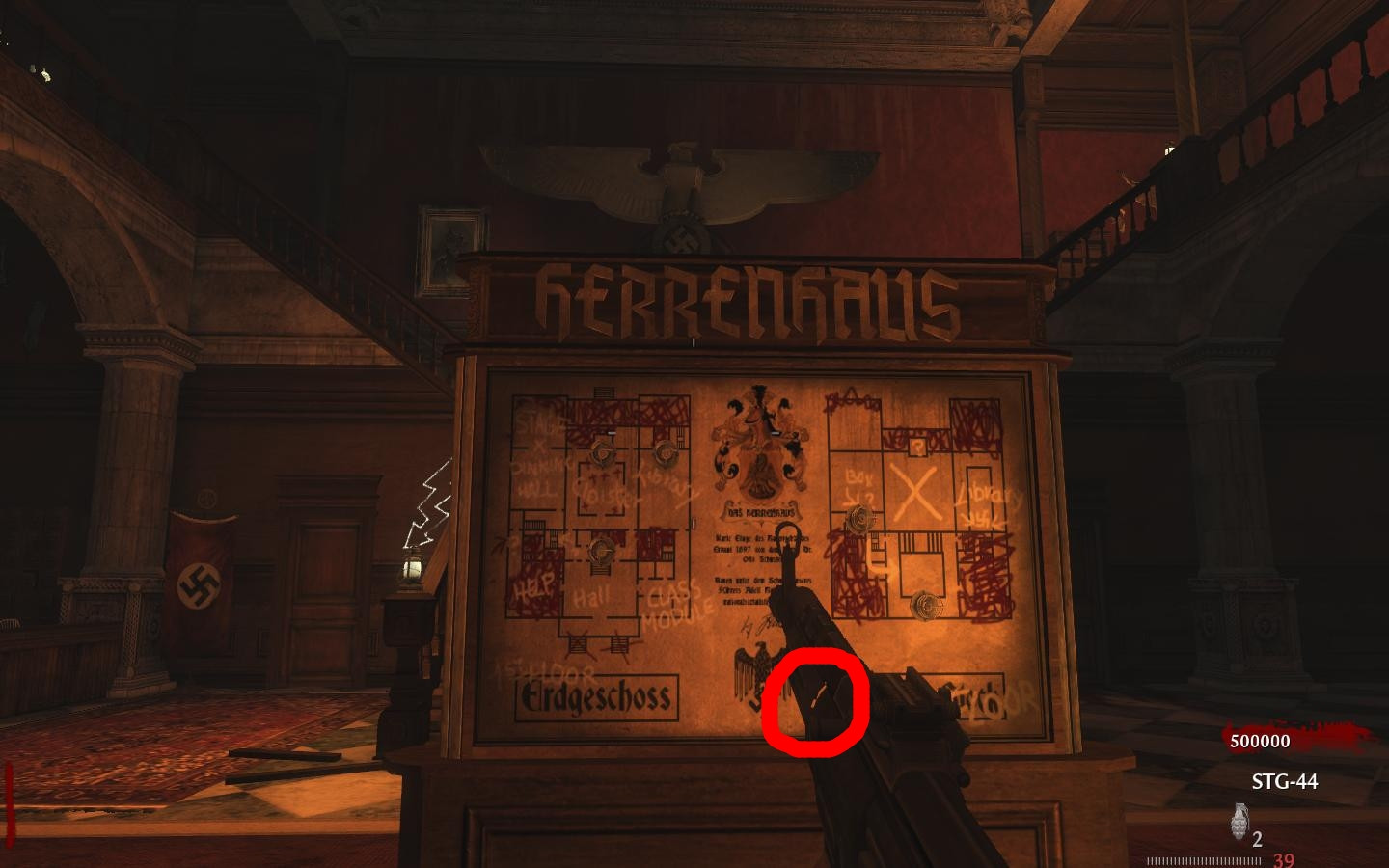
Ok, I've been learning on how to port properly weapons using maya and stuff and now I've got some weapons fully animated, working with stats and sounds. However, some of them seem to have little holes on the geometry, like the stg44, wich has a small invisible surface on the part where the gun canon joins the rest of the weapon. I think this is due to maya reducing polygons in the exporting proces, so some surfaces may not align properly.

Any clues? Here's an image of the issue:


(I think I can fixing by modifing geometry in maya, but i want your advice)
broken avatar :(
  • DeletedUser
  • Deleted Member
×
broken avatar :(
DeletedUser
This user is deleted :(
Ok, I've been learning on how to port properly weapons using maya and stuff and now I've got some weapons fully animated, working with stats and sounds. However, some of them seem to have little holes on the geometry, like the stg44, wich has a small invisible surface on the part where the gun canon joins the rest of the weapon. I think this is due to maya reducing polygons in the exporting proces, so some surfaces may not align properly.

Any clues? Here's an image of the issue:

(Image removed from quote.)

(I think I can fixing by modifing geometry in maya, but i want your advice)

I am not sure you can fix this
broken avatar :(
  • steviewonder87
  • Deleted Member
×
broken avatar :(
steviewonder87
This user is deleted :(
Well I know for sure Cowman doesn't know how to fix this... :P
I know how to fix this but it's quite complicated and that easy to explain on here, if you want you can add me on Skype and I'll try talk you through it  ;)
broken avatar :(
×
broken avatar :(
Location: mtMellieha
Date Registered: 15 July 2013
Last active: 5 years ago
Posts
43
Respect
Forum Rank
Legless Crawler
Primary Group
Donator ♥
My Groups
More
My Contact & Social Links
More
×
mrthomas3697's Groups
Donator ♥ Benevolent Soul who has our eternal gratitude and exclusive access to betas and the donator section of the forum.
mrthomas3697's Contact & Social Linksmrthomas3697mrthomas3697mrthomas3697
go to the hypershade panel on maya and remove the transparency channel for the material. That should solve the problem.
broken avatar :(
  • steviewonder87
  • Deleted Member
×
broken avatar :(
steviewonder87
This user is deleted :(
No that isn't the problem, the problem is with the meshes not the materials... ::)
broken avatar :(
  • zombie madness
  • Deleted Member
×
broken avatar :(
zombie madness
This user is deleted :(
you have probibly deleted a mesh that was there and didnt realise thats all i can think of

 
Loading ...