UGX-Mods Login

or login with an authentication provider below
Sign In with Google
Sign In with Twitter
Sign In with Discord
Sign In with Steam
Sign In with Facebook
Sign In with Twitch

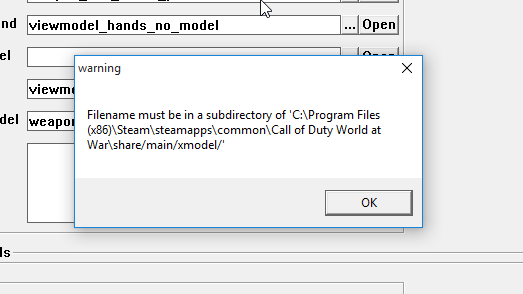
Asset Manager Error

broken avatar :(
Created 10 years ago
by projectcasey
0 Members and 1 Guest are viewing this topic.
1,610 views
broken avatar :(
×
broken avatar :(
Location: us
Date Registered: 7 September 2014
Last active: 10 years ago
Posts
9
Respect
Forum Rank
Legless Crawler
Primary Group
Member
×
projectcasey's Groups
projectcasey's Contact & Social Links
so basically, every time i convert my xmodels, it exports the correct "xmodels" folder located in "raw", but then when i try to select my newly created xmodel in asset manager it gives me this error, which confuses me because one i dont see that directory and secondly because it is in the correct folder. please help :/
broken avatar :(
  • Exofile
  • Deleted Member
×
broken avatar :(
Exofile
This user is deleted :(
I store imported models in model_export, then convert them in assman, which makes the model in raw/xmodel, not sure if you're saying you're storing the unconverted ones in raw?
broken avatar :(
×
broken avatar :(
Location: gbMilton Keynes
Date Registered: 17 January 2014
Last active: 6 years ago
Posts
6,875
Respect
Forum Rank
Immortal
Primary Group
Scripter
My Groups
More
My Contact & Social Links
More
Signature
If you want scripts / features made for you, then contact me by PM or email / skype etc
it will cost you tho so if you have no intention of reciprocating don't even waste my time ;)
×
Harry Bo21's Groups
Donator ♥ Benevolent Soul who has our eternal gratitude and exclusive access to betas and the donator section of the forum.
Scripter Has shown effort and knowledge in the area of scripting while being a part of the UGX-Mods community.
Harry Bo21's Contact & Social LinksHarryBo000[email protected]HarryBo21
its directing you to the wrong location

mine was doing this a while ago, trying to think why?

did you type or copy the name into the box? If so it might be missing the file path and defaulting. Make sure you click the 3 little dots button beside it and navigate to the file

they should really be in

root/model_export

as for the rest

root/sound_assets
root/xanim_export
root/texture_export

although you can have them anywhere, just needs to be a folder in your root

 
Loading ...