UGX-Mods Login

or login with an authentication provider below
Sign In with Google
Sign In with Twitter
Sign In with Discord
Sign In with Steam
Sign In with Facebook
Sign In with Twitch

Found another way around importing 3d models

broken avatar :(
Created 11 years ago
by brandontr3
0 Members and 1 Guest are viewing this topic.
4,658 views
broken avatar :(
×
broken avatar :(
Location: us
Date Registered: 9 September 2014
Last active: 5 years ago
Posts
230
Respect
Forum Rank
Mr. Elemental
Primary Group
Member
×
brandontr3's Groups
brandontr3's Contact & Social Links
So instead of using assman with lime because it doesnt want to work, i tried exporting the car model i took from bo2 from max as obj, then opened it in Maya so i can export it as an xmodel, i applied only one texure on it then named the texture, applied the color and exported it. It worked, so i put the model in xmodel and the texure in raw/images, then i went to asset manager and opened up the material and it converted correctly, then i opened up the modle converted it and it worked.
:IT appears in Asset Viewer.
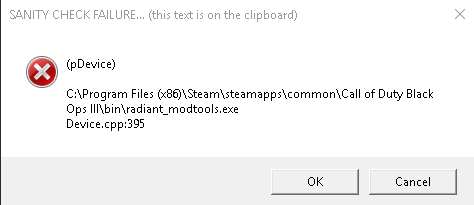
I went to open my map in Radiant, opened xmodel placed my model theennnn it said it worked but it didnt appear AND radiant crashed.
Theres gotta be a way around it.
Any ideas?
This topic contains a post which is marked as the Best Answer. Click here to view it.
broken avatar :(
  • DeletedUser
  • Deleted Member
×
broken avatar :(
DeletedUser
This user is deleted :(
What exactly isn't working with lime, for you to be able to export them as .obj instead of .ma?
broken avatar :(
×
broken avatar :(
OnionmanVere Bo21
Location: ieu dnt wnt 2 no
Date Registered: 27 September 2013
Last active: 4 months ago
Posts
1,863
Respect
Forum Rank
Zombie Destroyer
Primary Group
Mapper
My Groups
More
Personal Quote
ok
Signature
Aye mate you don't know me so y don't you shut tf up ok buddy :)

×
Scobalula's Groups
Donator ♥ Benevolent Soul who has our eternal gratitude and exclusive access to betas and the donator section of the forum.
Box Mappers Elite
Box Mappers Elite
Mapper Has released one or more maps to the UGX-Mods community.
Scripter Has shown effort and knowledge in the area of scripting while being a part of the UGX-Mods community.
Scobalula's Contact & Social Links
In Maya select the object, make sure to Select Hierachy, then go to Mesh>Seperate  (or something along those lines), that worked for me when Models were crashing Radiant, though most models can be exported as XE (.xmodel_export) safely direct from Lime from Black Ops 2.
 
broken avatar :(
×
broken avatar :(
Location: us
Date Registered: 9 September 2014
Last active: 5 years ago
Posts
230
Respect
Forum Rank
Mr. Elemental
Primary Group
Member
×
brandontr3's Groups
brandontr3's Contact & Social Links
Whats going on it like when the youtubers go and take the lime gdt and put it in their asset manager, they open it and the only the models and materials they need opens . when i do it i have 1000 materials and models which makes it har dofr me to find what is for what. Also asset manager gives me a debug error all the time.
And thank you for the seperating idea!

Double Post Merge: May 01, 2015, 01:54:27 pm
Scobubla (sorry if i didnt spell it right off the top of my head), i watched videos on how to do this and this is the order i follow:
1. Turn black ops 2 on an use lime to take the model
2. Export the sleected model.
3. take the gdt file in Lime folder and put it in source data
4. Put the exporte model and images folder in model_export folder of waw.
5. Open asset manager, select all the materials and convert them.
6. Convert model.
Done
Is this right? Is this order the reason why the model i converted didnt show up in radiant and crashed it? xD
Last Edit: May 01, 2015, 01:54:27 pm by brandontr3
broken avatar :(
  • steviewonder87
  • Deleted Member
×
broken avatar :(
steviewonder87
This user is deleted :(
i tried exporting the car model i took from bo2 from max as obj, then opened it in Maya so i can export it as an xmodel
Why would u export to obj into Max and then export that from Maya into xmodelexport, rather than a) exporting directly to Maya as an .ma or b) exporting as xmodelexport in the first place with Lime ???
broken avatar :(
×
broken avatar :(
Location: us
Date Registered: 27 January 2015
Last active: 10 years ago
Posts
337
Respect
Forum Rank
Perk Hacker
Primary Group
Member
Signature
×
liamsa669's Groups
liamsa669's Contact & Social Links
which model is it? some models are over 15k vertices and thus crashing radient.
broken avatar :(
×
broken avatar :(
Location: us
Date Registered: 9 September 2014
Last active: 5 years ago
Posts
230
Respect
Forum Rank
Mr. Elemental
Primary Group
Member
×
brandontr3's Groups
brandontr3's Contact & Social Links
Because it will not work. Maya keeps giving me all these different errors for each thing. I cant even export animations or guns cuz of maya
broken avatar :(
×
broken avatar :(
Location: gbMilton Keynes
Date Registered: 17 January 2014
Last active: 6 years ago
Posts
6,875
Respect
Forum Rank
Immortal
Primary Group
Scripter
My Groups
More
My Contact & Social Links
More
Signature
If you want scripts / features made for you, then contact me by PM or email / skype etc
it will cost you tho so if you have no intention of reciprocating don't even waste my time ;)
×
Harry Bo21's Groups
Donator ♥ Benevolent Soul who has our eternal gratitude and exclusive access to betas and the donator section of the forum.
Scripter Has shown effort and knowledge in the area of scripting while being a part of the UGX-Mods community.
Harry Bo21's Contact & Social LinksHarryBo000[email protected]HarryBo21
your getting all those textures in the GDT coz you have it set to make "all" of them, which is every model and texture in the map you had loaded

there are instructions bundled with lime explaining how to separate them, otherwise you can delete them yourself, or copy the ones you need into another GDT
broken avatar :(
×
broken avatar :(
Location: us
Date Registered: 9 September 2014
Last active: 5 years ago
Posts
230
Respect
Forum Rank
Mr. Elemental
Primary Group
Member
×
brandontr3's Groups
brandontr3's Contact & Social Links
thank you Harry! btw i got the model in my map! :D
Just a little problem that should be fixable and i just wanna make sure before i do it.
My model from lime in radiant appears with all the textures
But in the actual gameplay its a complete white model
Why could it be like this? is it becuas ei should put the actual iwi files of the textures into my map files?
This is prolly the answer but i wanna make sure before i screw anything up lol
Marked as best answer by brandontr3 11 years ago
broken avatar :(
×
broken avatar :(
Location: gbMilton Keynes
Date Registered: 17 January 2014
Last active: 6 years ago
Posts
6,875
Respect
Forum Rank
Immortal
Primary Group
Scripter
My Groups
More
My Contact & Social Links
More
×
Harry Bo21's Groups
Donator ♥ Benevolent Soul who has our eternal gratitude and exclusive access to betas and the donator section of the forum.
Scripter Has shown effort and knowledge in the area of scripting while being a part of the UGX-Mods community.
Harry Bo21's Contact & Social LinksHarryBo000[email protected]HarryBo21
you need to copy the images into

root/mods/YOURMOD/images/

Also when your importing models for radiant, make sure you close radiant and open it again, or the textures wont show
broken avatar :(
×
broken avatar :(
Location: us
Date Registered: 9 September 2014
Last active: 5 years ago
Posts
230
Respect
Forum Rank
Mr. Elemental
Primary Group
Member
×
brandontr3's Groups
brandontr3's Contact & Social Links
I figured it was that. Thank you! Now all i gotta do is hope importing guns works right cuz so far it hasnt been xD

 
Loading ...